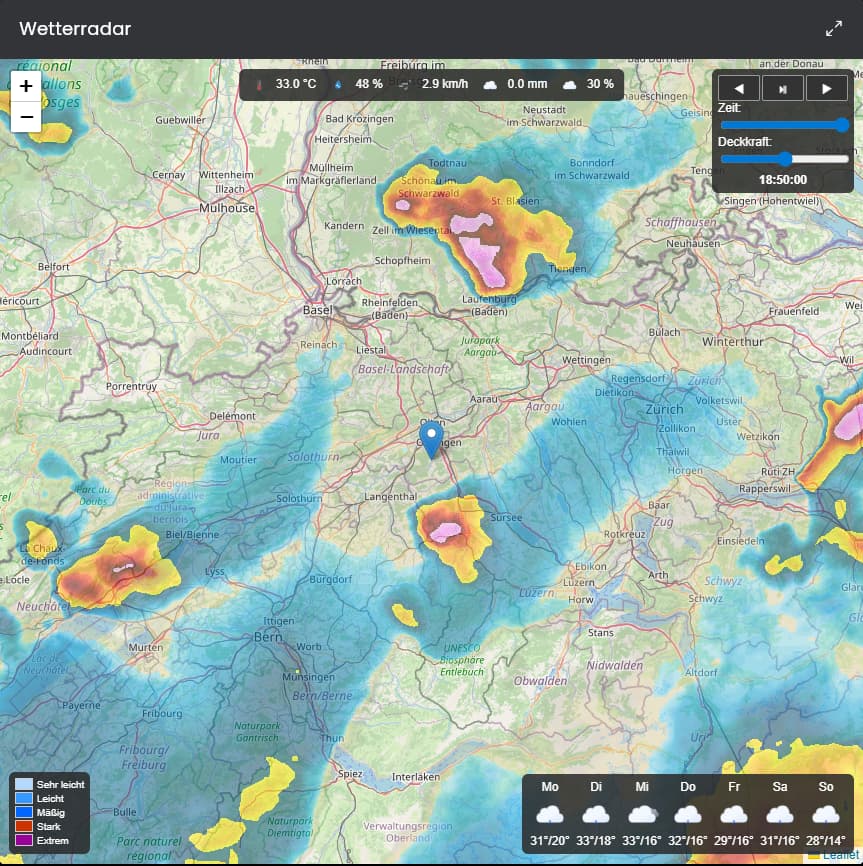
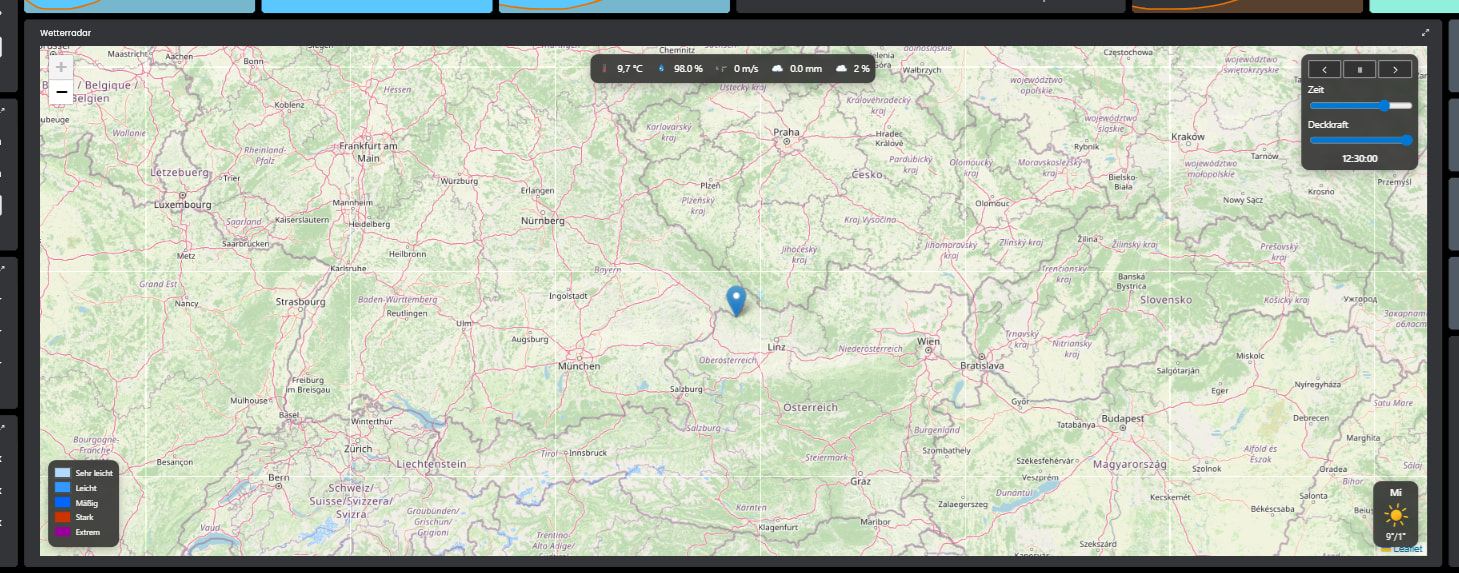
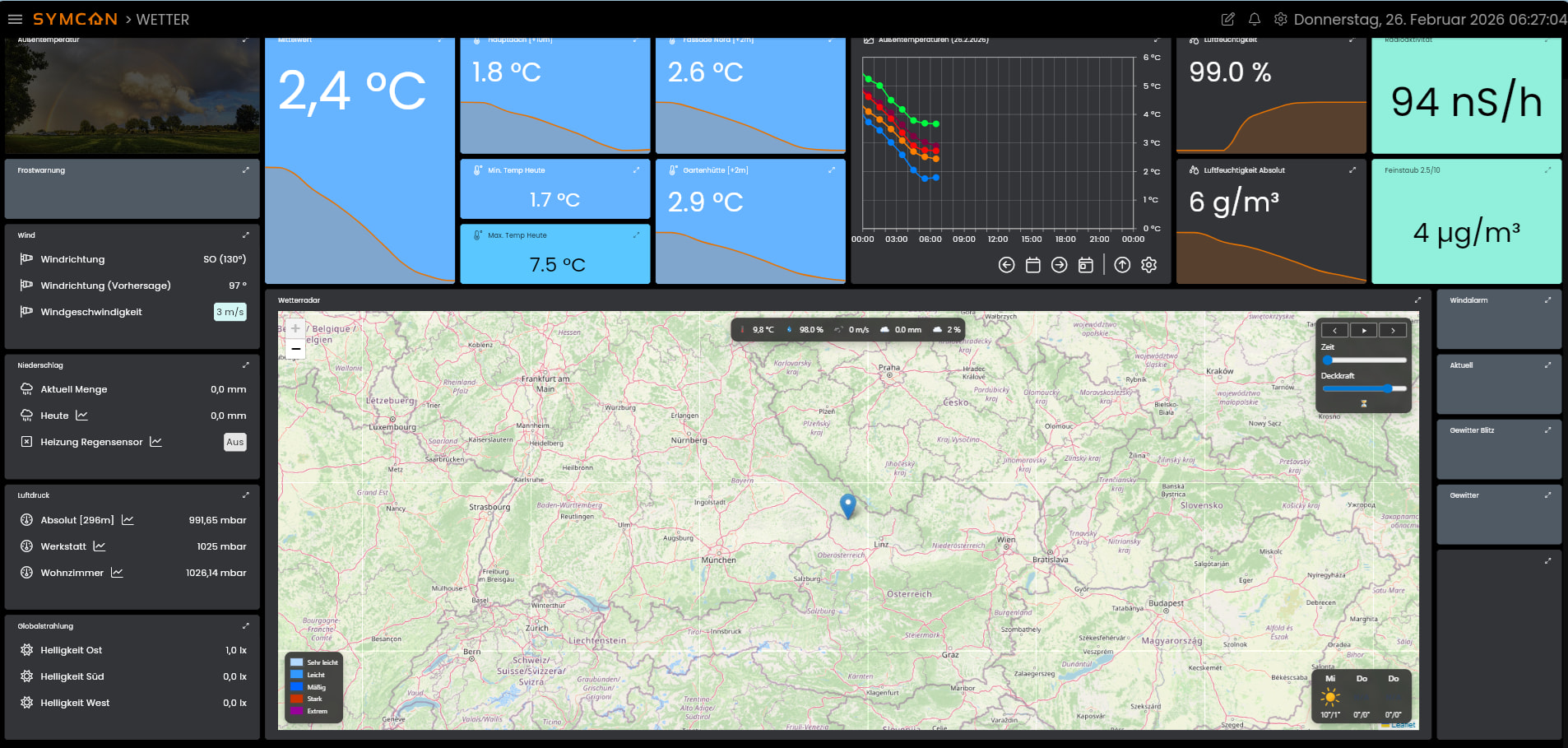
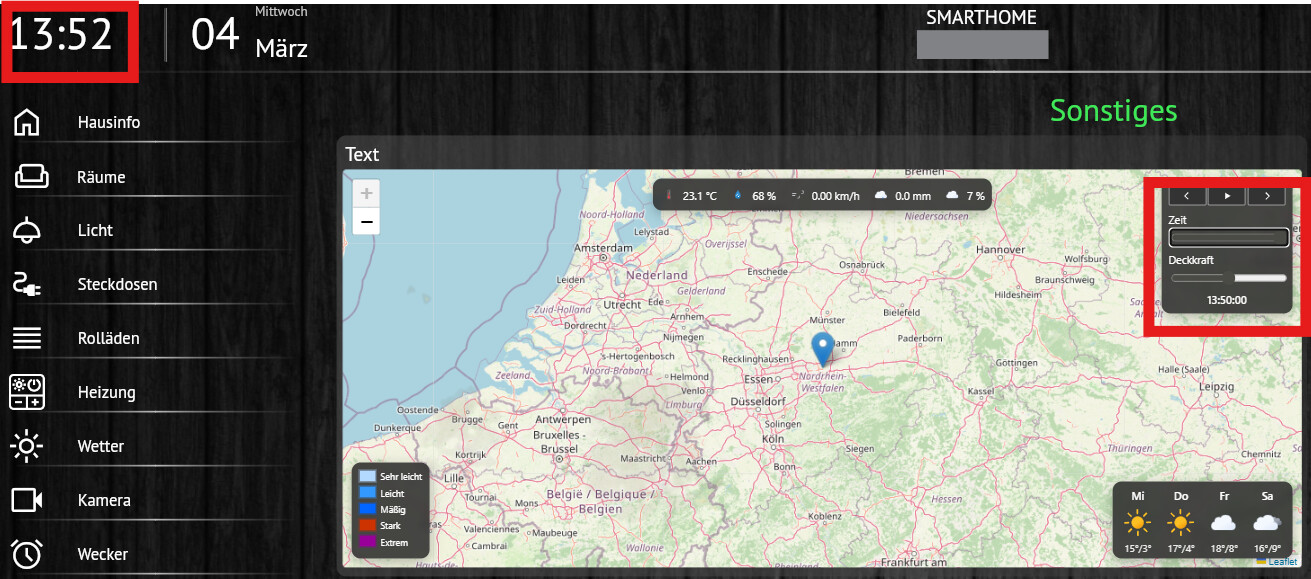
Habe mal das coole OpenWeatherMap-Modul von @demel42 als Grundlage genommen und ein Regenradar gezimmert.
Es werden animierte Wetter-Icons von Basmilus verwendet ( GitHub - basmilius/weather-icons: Free to use animated weather icons. · GitHub )
Die Karten kommen von verschiedenen Anbietern, welche in der Konfiguration ausgewählt werden können.
Die Anzeige des Standortes auf der Karte wir durch das CSS von Leaflet ermöglicht (https://leafletjs.com)
Die Übelagerung der Karte durch den Regenradar wird durch Rainviewer ermöglicht (https://www.rainviewer.com/)
Unterstützung zur Installation befindet sich im Script
Die Wert oben mittig sind die aktuellen Werte aus Openweather oder alternativ von der eigenen Station (Im Script konfigurierbar).
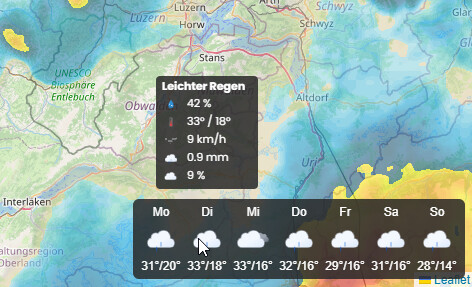
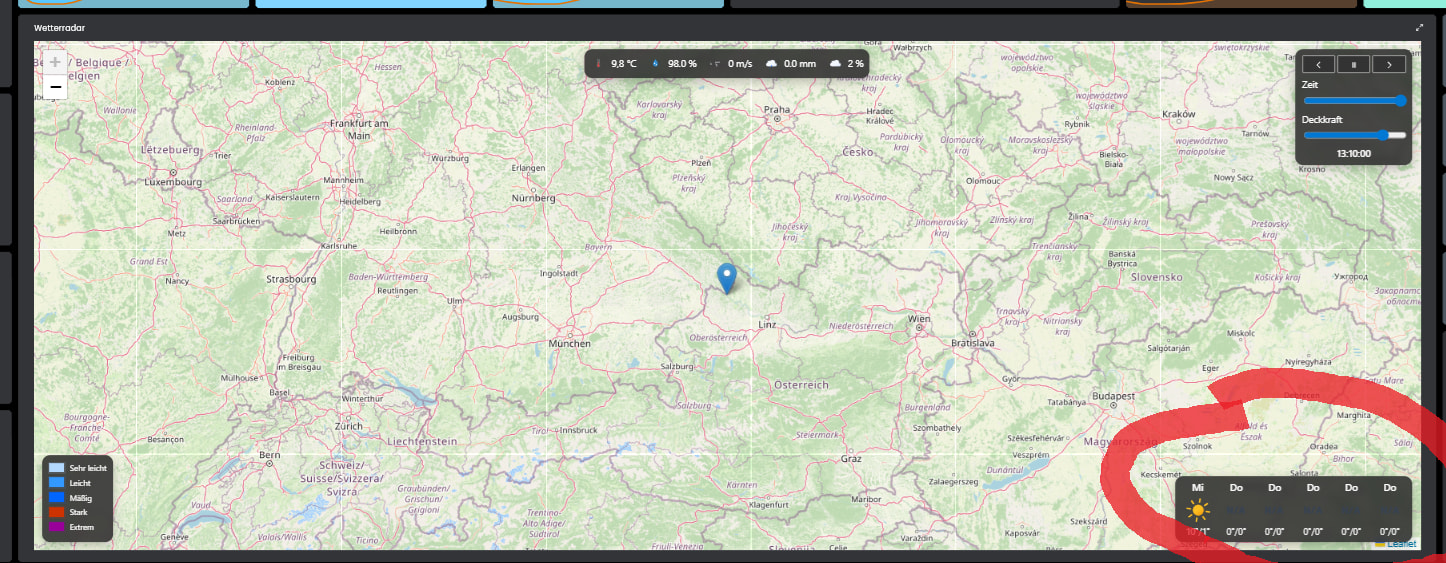
Die Vorhersage hat noch nette Tooltips beim drüber hoovern
30.06.2025 Version 1.0:
- Initiale Version
07.09.2025 Version 1.1
- Responsives Design für verschiedene Kachelgrössen oder Handy-App
11.09.2025 Version 1.2
- Vorhersage hinzugefügt
11.09.2025 Version 1.3
-
Responsives Design verbessert
-
Infos zur zyklischen Erneuerung aktualisiert
10.01.2026 Version 1.4
- Auto-Play Funktion hinzugefügt (im Script aktivierbar)
12.01.2026 Version 1.5
-
Deckkraft voreinstellbar (im Script aktivierbar)
-
Fehler im responsiven Design für Handy-Darstellung behoben
11.02.2026 Version 1.6
-
Standard Zoom-Stufe auf 7 angepasst, da Rainviewer bei stärkerem Zoom keine Daten mehr liefert
-
Zusätzlich Map-maxZoom und Radar-maxZoom auf 7 begrenzt, damit keine leeren Tiles angefragt werden
-
Wiederholrate in Autoplay auf 5 Sekunden erhöht
24.02.2026 Version 1.7
-
Radar-Tiles pro Frame gecacht: für jede Zeitstufe wird ein Tile-Layer angelegt und behalten,
-
Beim Umschalten der Frames wird nur noch die Opacity geändert (keine erneuten Tile-Loads für alte Frames).
-
Dank Caching kann der Autoplay-Intervall wieder auf 1 Sekunde gesetzt werden.
-
Autoplay wird automatisch beendet, sobald der Benutzer zoomt.
-
Zoom-Abbruch von Autoplay wird erst nach abgeschlossener Initialisierung aktiv.
-
Rainviewer-Frames werden clientseitig immer zur Minute 1, 11, 21, 31, 41, 51 neu geladen, ohne die Seite neu zu laden.
-
Autoplay bleibt dabei erhalten. Es braucht kein Event mehr auf das Script gesetzt zu werden.
27.02.2026 Version 1.8
- Radar-Caching-Logik auf offiziellen Rainviewer-Beispielcode umgestellt.
- Nowcast entsprechend Rainviewer-API entfernt (nur noch past-Frames).
- Bei fehlerhaften Tiles wird nun ein Timer statt der Zeit eingeblendet. Ein Klick auf diesen Timer lädt den Frame neu und die Tiles werden erneut gecacht. Ansonsten wird nach 1 Minute der Frame automatisch neu geladen.
- Beim ersten manuellen Ausführen legt das Script automatisch ein zyklisches Ereignis an, welches das Script jeweils zur Minute 1, 11, 21, 31, 41 und 51 (alle 10 Minuten, Offset 1) ausführt.
28.02.2026 Version 1.9
- Fehler beim anlegen des Events behoben, dass nur ein gewisser Zeitbereich pro Tag aktiviert wurde.
15.03.2026 Version 1.10
- Infolge strengerer Richtlinien von openStreetMap und entsprechender Fehlermeldungen wurde auf freie Karten umgestellt. Ein Set zur Auswahl befindet sich in der Konfiguration.
15.03.2026 Version 1.11
- Die Auswahl der Deckkraft im Bedienpanel lässt sich in der Konfiguration ausblenden.
<?php
// ==========================================
// INFO zum Script:
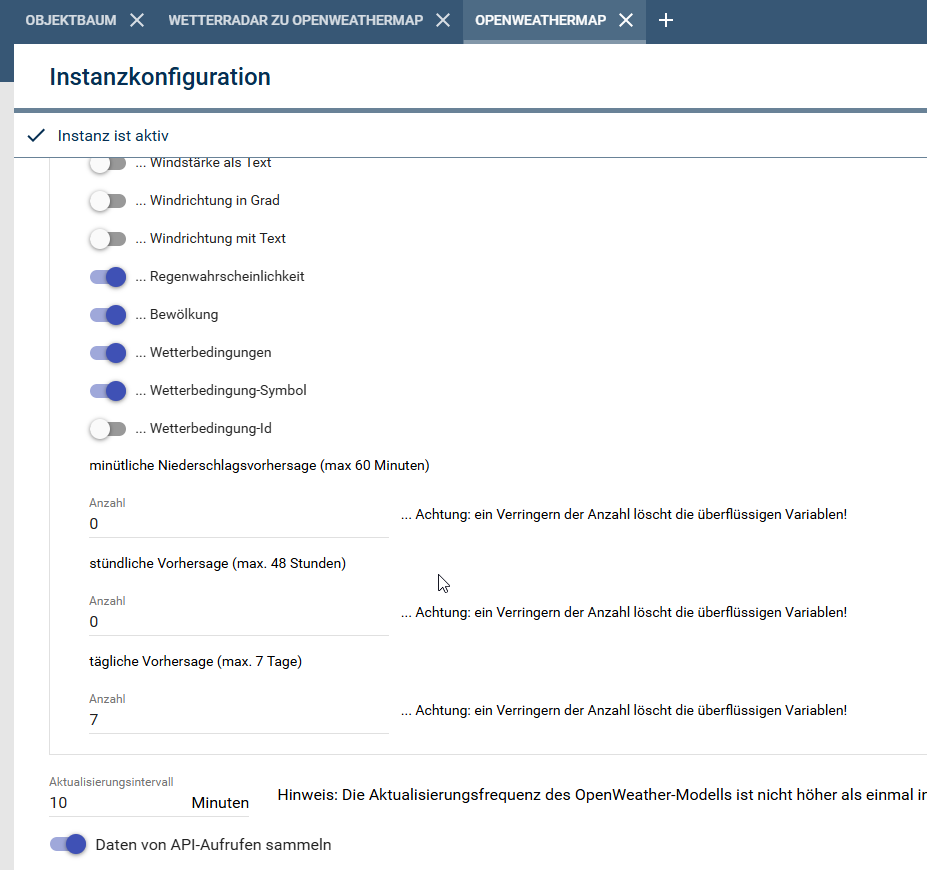
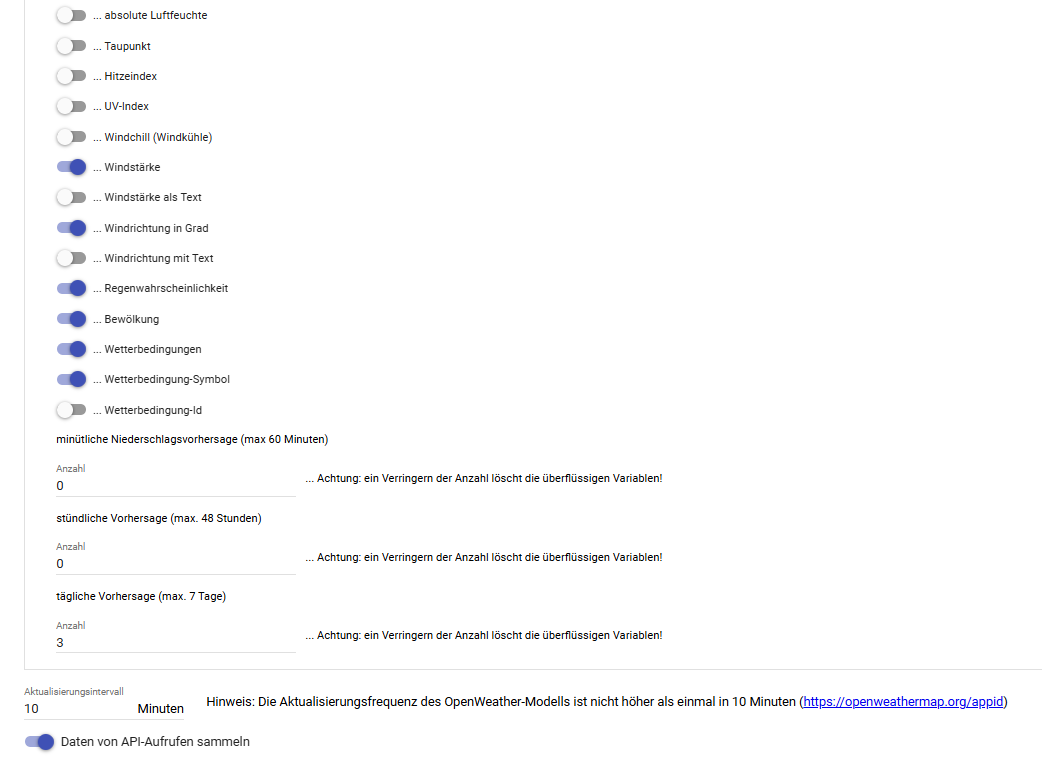
// Damit die Wettervorhersage funktioniert, ist eine Anbindung an das Openweathermap-Modul (OpenWeaterOneCall) von @demel42 nötig und die Location ist im Modul zu konfigurieren.
// Es muss eine String-Variable vom Typ html-Box erstellt werden für die Anzeige in der Visualisierung.
// Es werden animierte Wetter-Icons von Basmilus verwendet (https://github.com/basmilius/weather-icons)
// Die Karten kommen von verschiedenen Anbietern, welche in der Konfiguration ausgewählt werden können.
// Die Anzeige des Standortes auf der Karte wird durch das CSS von Leaflet ermöglicht (https://leafletjs.com)
// Die Überlagerung der Karte durch den Regenradar wird durch Rainviewer ermöglicht (https://www.rainviewer.com/)
//
// ==========================================
//
// 30.06.2025 Version 1.0:
// Initiale Version
//
// 07.09.2025 Version 1.1
// Responsives Design für verschiedene Kachelgrössen oder Handy-App
//
// 11.09.2025 Version 1.2
// Vorhersage hinzugefügt
//
// 11.09.2025 Version 1.3
// Responsives Design verbessert
// Infos zur zyklischen Erneuerung aktualisiert
//
// 10.01.2026 Version 1.4
// Auto-Play Funktion hinzugefügt (im Script aktivierbar)
//
// 12.01.2026 Version 1.5
// Deckkraft voreinstellbar (im Script aktivierbar)
// Fehler im responsiven Design für Handy-Darstellung behoben
//
// 11.02.2026 Version 1.6
// Standard Zoom-Stufe auf 7 angepasst, da Rainviewer bei stärkerem Zoom keine Daten mehr liefert
// Zusätzlich Map-maxZoom und Radar-maxZoom auf 7 begrenzt, damit keine leeren Tiles angefragt werden
// Wiederholrate in Autoplay auf 5 Sekunden erhöht
//
// 24.02.2026 Version 1.7
// Radar-Tiles pro Frame gecacht: für jede Zeitstufe wird ein Tile-Layer angelegt und behalten,
// beim Umschalten der Frames wird nur noch die Opacity geändert (keine erneuten Tile-Loads für alte Frames).
// Dank Caching kann der Autoplay-Intervall wieder auf 1 Sekunde gesetzt werden.
// Autoplay wird automatisch beendet, sobald der Benutzer zoomt.
// Zoom-Abbruch von Autoplay wird erst nach abgeschlossener Initialisierung aktiv.
// Rainviewer-Frames wurden clientseitig zyklisch neu geladen.
//
// 27.02.2026 Version 1.8
// Radar-Caching-Logik auf offiziellen Rainviewer-Beispielcode umgestellt.
// Nowcast entsprechend Rainviewer-API entfernt (nur noch past-Frames).
// Bei fehlerhaften Tiles wird nun ein Timer statt der Zeit eingeblendet.
// Ein Klick auf diesen Timer lädt den Frame neu und die Tiles werden erneut gecacht.
// Ansonsten wird nach 1 Minunte der Frame automatisch neu geladen.
// Beim ersten manuellen Ausführen legt das Script automatisch ein zyklisches Ereignis an,
// welches das Script jeweils zur Minute 1, 11, 21, 31, 41 und 51 (alle 10 Minuten, Offset 1) ausführt.
//
// 28.02.2026 Version 1.9
// Fehler beim anlegen des Events behoben, dass nur ein gewisser Zeitbereich pro Tag aktiviert wurde.
//
// 15.03.2026 Version 1.10
// Infolge strengerer Richtlinien von openStreeMap und entsprechender Fehlermeldungen wurde auf freie Karten umgestellt. Ein Set zur Auswahl befindet sich in der Konfiguration.
//
// 15.03.2026 Version 1.11
// Die Auswahl der Deckkraft im Bedienpanel lässt sich in der Konfiguration ausblenden.
//
// ==========================================
declare(strict_types=1);
// ==========================================
// KONFIGURATION
// ==========================================
$htmlBoxID = 57536; // ~HTML-Box ID
$owmInstID = 42366; // OpenWeatherOneCall-Instanz-ID
$autoplay = 1; // 0 = aus, 1 = ein
$zoom = 7; // Karten-Zoomstufe (Rainviewer max. 7)
$opacityDefault = 0.50; // Deckkraft Startwert (0.00 - 1.00)
$showOpacityControl = false; // true = Deckkraft-Regler anzeigen, false = ausblenden
// Eigene aktuelle Werte (optional), wenn ID = 0, dann werden die Daten aus OpenWeatherMap verwendet
$temperatureID = 54867; // Temperatur-Variable ID
$humidityID = 29783; // Luftfeuchte-Variable ID
$windSpeedID = 45190; // Windstärke-Variable ID
$rain1hID = 13080; // Niederschlag 1h-Variable ID
// HELL oder DUNKEL — 'light' | 'dark'
$theme = 'dark';
$mapStyle = "street";
// street
// topo
// natgeo
// satellite
// hot
// osmfr
// opentopo
// ==========================================
// BASISDATEN (Koordinaten)
// ==========================================
$location = json_decode(IPS_GetProperty($owmInstID, 'location'), true);
$lat = $location['latitude'];
$lon = $location['longitude'];
$daily_forecast_count = (int) IPS_GetProperty($owmInstID, 'daily_forecast_count');
// ==========================================
// AKTUELLE WERTE HOLEN (direkt oder OWM)
// ==========================================
$temperature = ($temperatureID > 0)
? GetValueFormatted($temperatureID)
: GetValueFormatted(IPS_GetObjectIDByIdent('Temperature', $owmInstID));
$humidity = ($humidityID > 0)
? GetValueFormatted($humidityID)
: GetValueFormatted(IPS_GetObjectIDByIdent('Humidity', $owmInstID));
$wind_speed = ($windSpeedID > 0)
? GetValueFormatted($windSpeedID)
: GetValueFormatted(IPS_GetObjectIDByIdent('WindSpeed', $owmInstID));
$rain_1h = ($rain1hID > 0)
? GetValueFormatted($rain1hID)
: GetValueFormatted(IPS_GetObjectIDByIdent('Rain_1h', $owmInstID));
$clouds = GetValueFormatted(IPS_GetObjectIDByIdent('Cloudiness', $owmInstID));
// ==========================================
// AUTOPLAY
// ==========================================
$autoplay = ((int)$autoplay === 1);
$autoplayJs = $autoplay ? 'true' : 'false';
// ==========================================
// KARTENSTIL
// ==========================================
$mapStyles = [
'street' => [
'url' => 'https://server.arcgisonline.com/ArcGIS/rest/services/World_Street_Map/MapServer/tile/{z}/{y}/{x}',
'attribution' => '© Esri, HERE, Garmin, FAO, NOAA, USGS, OpenStreetMap contributors'
],
'topo' => [
'url' => 'https://server.arcgisonline.com/ArcGIS/rest/services/World_Topo_Map/MapServer/tile/{z}/{y}/{x}',
'attribution' => '© Esri, HERE, Garmin, FAO, NOAA, USGS, OpenStreetMap contributors'
],
'natgeo' => [
'url' => 'https://server.arcgisonline.com/ArcGIS/rest/services/NatGeo_World_Map/MapServer/tile/{z}/{y}/{x}',
'attribution' => '© Esri, National Geographic, Garmin, HERE, UNEP-WCMC, USGS, NASA, ESA, METI, NRCAN, GEBCO, NOAA, increment P Corp.'
],
'satellite' => [
'url' => 'https://server.arcgisonline.com/ArcGIS/rest/services/World_Imagery/MapServer/tile/{z}/{y}/{x}',
'attribution' => '© Esri, Maxar, Earthstar Geographics, and the GIS User Community'
],
'hot' => [
'url' => 'https://{s}.tile.openstreetmap.fr/hot/{z}/{x}/{y}.png',
'subdomains' => ['a', 'b', 'c'],
'attribution' => '© OpenStreetMap contributors, Tiles style by Humanitarian OpenStreetMap Team hosted by OpenStreetMap France'
],
'osmfr' => [
'url' => 'https://{s}.tile.openstreetmap.fr/osmfr/{z}/{x}/{y}.png',
'subdomains' => ['a', 'b', 'c'],
'attribution' => '© OpenStreetMap contributors, Tiles style by OpenStreetMap France'
],
'opentopo' => [
'url' => 'https://{s}.tile.opentopomap.org/{z}/{x}/{y}.png',
'subdomains' => ['a', 'b', 'c'],
'attribution' => '© OpenStreetMap contributors, SRTM | Kartendarstellung: © OpenTopoMap'
]
];
if (!isset($mapStyles[$mapStyle])) {
$mapStyle = 'street';
}
$mapTileUrl = $mapStyles[$mapStyle]['url'];
$mapAttribution = $mapStyles[$mapStyle]['attribution'];
$mapSubdomains = $mapStyles[$mapStyle]['subdomains'] ?? [];
$mapSubdomainsJson = json_encode($mapSubdomains, JSON_UNESCAPED_SLASHES | JSON_HEX_APOS | JSON_HEX_QUOT);
// ==========================================
// VORHERSAGE LADEN (immer OWM)
// ==========================================
$forecast = [];
for ($i = 0; $i < $daily_forecast_count; $i++) {
$pre = 'DailyForecast';
$post = '_' . sprintf('%02d', $i);
$idSnow = @IPS_GetObjectIDByIdent($pre . 'Snow' . $post, $owmInstID);
$forecast[] = [
'dt' => GetValueInteger(IPS_GetObjectIDByIdent($pre . 'Begin' . $post, $owmInstID)),
'min' => GetValueFloat(IPS_GetObjectIDByIdent($pre . 'TemperatureMin' . $post, $owmInstID)),
'max' => GetValueFloat(IPS_GetObjectIDByIdent($pre . 'TemperatureMax' . $post, $owmInstID)),
'wind' => GetValueFloat(IPS_GetObjectIDByIdent($pre . 'WindSpeed' . $post, $owmInstID)),
'rain' => GetValueFloat(IPS_GetObjectIDByIdent($pre . 'Rain' . $post, $owmInstID)),
'snow' => $idSnow ? GetValueFloat($idSnow) : 0,
'icon' => GetValueString(IPS_GetObjectIDByIdent($pre . 'ConditionIcon' . $post, $owmInstID)),
'description' => GetValueString(IPS_GetObjectIDByIdent($pre . 'Conditions' . $post, $owmInstID)),
'humidity' => GetValueFloat(IPS_GetObjectIDByIdent($pre . 'Humidity' . $post, $owmInstID)),
'clouds' => GetValueFloat(IPS_GetObjectIDByIdent($pre . 'Cloudiness' . $post, $owmInstID)),
];
}
$json = json_encode($forecast, JSON_UNESCAPED_SLASHES | JSON_HEX_APOS | JSON_HEX_QUOT);
// ==========================================
// Automatisches zyklisches Ereignis anlegen
// ==========================================
//
// Beim ersten "Ausführen" (Konsole: Rechtsklick -> Ausführen) wird ein
// zyklisches Ereignis erstellt, das das Script alle 10 Minuten aufruft.
// Die erste Ausführung wird auf die nächste Minute aus {1,11,21,31,41,51}
// gelegt, sodass die Laufzeiten dann dauerhaft auf diesen Minuten liegen.
//
if ($_IPS['SENDER'] === 'Execute') {
$eventName = 'Radar & Forecast Auto-Update';
$eventID = @IPS_GetEventIDByName($eventName, $_IPS['SELF']);
if ($eventID === false) {
// Zyklisches Ereignis erstellen
$eventID = IPS_CreateEvent(1); // 1 = cyclic
IPS_SetName($eventID, $eventName);
IPS_SetParent($eventID, $_IPS['SELF']);
IPS_SetEventAction($eventID, "{7938A5A2-0981-5FE0-BE6C-8AA610D654EB}", []);
IPS_SetEventCyclic($eventID, 2, 1, 0, 0, 2, 10);
// Erste Ausführung auf nächste Minute 1,11,21,31,41,51 legen
$now = time();
$min = (int)date('i', $now);
$hour = (int)date('H', $now);
$targets = [1, 11, 21, 31, 41, 51];
$nextMin = 1;
$nextHour = $hour;
$found = false;
foreach ($targets as $t) {
if ($t > $min) {
$nextMin = $t;
$nextHour = $hour;
$found = true;
break;
}
}
if (!$found) {
// auf nächste Stunde, Minute 1
$nextHour++;
if ($nextHour >= 24) {
$nextHour = 0;
}
$nextMin = 1;
}
// Zeitfenster: 00:01 bis 23:59 (ganzer Tag)
$startTs = mktime(0, 1, 0);
$endTs = mktime(23, 59, 0);
IPS_SetEventCyclicTimeBounds($eventID, $startTs, $endTs);
// Ereignis aktivieren
IPS_SetEventActive($eventID, true);
}
}
// ==========================================
// HTML + JS + CSS
// ==========================================
$opacityDefault = max(0.0, min(1.0, (float)$opacityDefault));
$opacityControlStyle = $showOpacityControl ? '' : 'display:none;';
$html = <<<HTML
<!DOCTYPE html>
<html lang="de">
<head>
<meta charset="utf-8" />
<title>Radar & Forecast</title>
<meta name="viewport" content="width=device-width, initial-scale=1" />
<link rel="stylesheet" href="https://unpkg.com/leaflet/dist/leaflet.css" />
<style>
html, body, #map { height: 100%; margin: 0; }
body.theme-dark{
--bg: rgba(40,40,40,0.85); --text:#fff; --panel:#2b2b2b; --border:#444;
--btn-bg:#333; --btn-fg:#fff; --btn-border:#999;
}
body.theme-light{
--bg: rgba(255,255,255,0.9); --text:#222; --panel:#fff; --border:#ccc;
--btn-bg:#fff; --btn-fg:#000; --btn-border:#ddd;
}
:root {
--k: 1;
--fs: calc(12px * var(--k));
--fs-small: calc(11px * var(--k));
--fs-tiny: calc(10px * var(--k));
--pad: calc(8px * var(--k));
--gap: calc(8px * var(--k));
--radius: calc(10px * var(--k));
--shadow: 0 calc(4px * var(--k)) calc(14px * var(--k)) rgba(0,0,0,.25);
--icon: calc(20px * var(--k));
--forecast-icon: calc(40px * var(--k));
--legend-swatch-w: calc(18px * var(--k));
--legend-swatch-h: calc(12px * var(--k));
--controls-w: calc(220px * var(--k));
--range-h: calc(22px * var(--k));
--btn-pad-v: calc(8px * var(--k));
}
body { background: var(--bg); color: var(--text); font-family: system-ui, Segoe UI, Roboto, sans-serif; font-size: var(--fs); }
.panel { background: var(--bg); color: var(--text); border-radius: var(--radius); padding: var(--pad); box-shadow: var(--shadow); backdrop-filter: blur(4px); }
#current, #controls, #legend, #forecast { position: absolute; z-index: 1000; }
#map { z-index: 0; }
#current { top: 10px; left: 50%; transform: translateX(-50%); display: flex; gap: calc(var(--gap) + 6px); align-items: center; }
#controls{ top: 10px; right: 10px; width: var(--controls-w); }
#legend { bottom: 10px; left: 10px; }
#forecast{ bottom: 10px; right: 10px; display: flex; gap: var(--gap); padding: calc(var(--pad) - 2px) calc(var(--pad)); }
#controls .row { display:flex; gap: calc(var(--gap) - 2px); justify-content: space-between; margin-bottom: calc(var(--gap) - 2px); }
#controls button{
flex:1; display:flex; align-items:center; justify-content:center;
padding: var(--btn-pad-v) 0; font-size: var(--fs); line-height:1; gap:6px; min-width:0;
border-radius: calc(var(--radius) - 2px);
background: var(--btn-bg); color: var(--btn-fg); border: 1px solid var(--btn-border);
-webkit-appearance:none; appearance:none; background-image:none; box-shadow:none;
cursor: pointer;
}
#controls button:hover { filter: brightness(1.08); }
#controls label { display:block; font-size: var(--fs-small); margin: 6px 0 2px; }
#controls input[type=range]{ width:100%; height: var(--range-h); }
#frameTime { display:block; margin-top:6px; font-weight:600; text-align:center; font-size: var(--fs-small); }
.ico { width: 14px; height: 14px; display:inline-block; }
.ico svg { width: 100%; height: 100%; display:block; fill: currentColor; }
@media (min-width: 701px) and (max-width: 1300px) {
#current {
display: inline-flex;
width: max-content;
min-width: 340px;
max-width: 560px;
}
#current-values { flex: 0 0 auto; }
}
@media (min-width: 540px) {
#controls { width: 130px; }
#controls .row {
display: grid; grid-template-columns: repeat(3, 1fr);
column-gap: 2px; margin-bottom: 6px;
}
#controls button { border-radius: 2px; padding: 4px 0; font-size: 12px; }
#controls label { font-size: 12px; margin: 4px 0 2px; }
#controls input[type=range]{ height: 18px; }
#frameTime { font-size: 12px; margin-top: 4px; }
.ico { width: 12px; height: 12px; }
}
@media (max-width: 700px) and (min-width: 540px) {
#current{
top: 8px;
left: 56px;
right: auto;
transform: none;
display: inline-flex;
width: max-content;
min-width: 0;
max-width: calc(100vw - 56px - 16px - (130px + 16px));
justify-content: flex-end;
text-align: right;
flex-wrap: wrap;
gap: 6px;
}
}
@media (max-width: 539px) {
#current {
top: 8px;
left: auto;
right: 8px;
transform: none;
display: inline-flex;
width: max-content;
min-width: 0;
max-width: calc(100vw - 56px - 16px);
justify-content: flex-end;
text-align: right;
flex-wrap: wrap;
gap: 6px;
}
#controls{ left: auto; right: 8px; width: 120px; }
#controls .row { gap: 4px; margin-bottom: 6px; display:flex; }
#controls button { padding: 6px 0; font-size: 11px; border-radius: 6px; }
#controls label { font-size: 10px; margin: 4px 0 2px; }
#controls input[type=range]{ height: 16px; }
#frameTime { font-size: 10px; margin-top: 4px; }
}
#forecast { border-radius: var(--radius); }
.forecast-entry { text-align:center; }
.forecast-entry img { width: var(--forecast-icon); height: var(--forecast-icon); }
.forecast-entry .day { font-weight:600; margin-bottom: 2px; font-size: var(--fs); }
.forecast-entry .temp{ font-size: var(--fs-small); opacity:.9; }
.tooltip {
position: fixed;
background: var(--bg);
color: var(--text);
font-size: var(--fs-small);
padding: calc(var(--pad) - 2px) calc(var(--pad));
border-radius: var(--radius);
box-shadow: 0 calc(8px * var(--k)) calc(18px * var(--k)) rgba(0,0,0,.28);
white-space: normal;
line-height: 1.25;
max-width: calc(220px * var(--k));
z-index: 2000;
}
#current div { display:flex; align-items:center; gap: calc(6px * var(--k)); font-size: var(--fs); white-space: nowrap; }
#current img { width: var(--icon); height: var(--icon); }
#legend { font-size: var(--fs-tiny); }
#legend .legend-entry { display:flex; align-items:center; gap: calc(var(--gap) - 4px); margin-bottom: calc(4px * var(--k)); }
#legend .legend-color { width: var(--legend-swatch-w); height: var(--legend-swatch-h); border: 1px solid var(--border); }
</style>
</head>
<body class="theme-{$theme}">
<div id="map"></div>
<div id="current" class="panel">
<div><img src="https://raw.githubusercontent.com/basmilius/weather-icons/dev/production/fill/svg/thermometer.svg" alt=""> {$temperature}</div>
<div><img src="https://raw.githubusercontent.com/basmilius/weather-icons/dev/production/fill/svg/humidity.svg" alt=""> {$humidity}</div>
<div><img src="https://raw.githubusercontent.com/basmilius/weather-icons/dev/production/fill/svg/wind.svg" alt=""> {$wind_speed}</div>
<div><img src="https://raw.githubusercontent.com/basmilius/weather-icons/dev/production/fill/svg/rain.svg" alt=""> {$rain_1h}</div>
<div><img src="https://raw.githubusercontent.com/basmilius/weather-icons/dev/production/fill/svg/cloudy.svg" alt=""> {$clouds}</div>
</div>
<div id="controls" class="panel">
<div class="row">
<button id="btnPrev" title="Vorheriger Frame" aria-label="Vorheriger">
<span class="ico" aria-hidden="true">
<svg viewBox="0 0 24 24"><path d="M15.5 5.5 8.5 12l7 6.5-1.5 1.5L5.5 12l8.5-8.5 1.5 2z"/></svg>
</span>
</button>
<button id="btnPlay" title="Abspielen" aria-label="Abspielen">
<span class="ico" aria-hidden="true"></span>
</button>
<button id="btnNext" title="Nächster Frame" aria-label="Nächster">
<span class="ico" aria-hidden="true">
<svg viewBox="0 0 24 24"><path d="m8.5 5.5 1.5-2L18.5 12l-8.5 8.5-1.5-1.5 7-6.5-7-6.5z"/></svg>
</span>
</button>
</div>
<label for="frameSlider">Zeit</label>
<input id="frameSlider" type="range" min="0" max="0" step="1" value="0" />
<div id="opacityControl" style="{$opacityControlStyle}">
<label for="opacityRange">Deckkraft</label>
<input id="opacityRange" type="range" min="0" max="1" step="0.01" value="{$opacityDefault}" />
</div>
<span id="frameTime">⏳</span>
</div>
<div id="legend" class="panel">
<div class="legend-entry"><div class="legend-color" style="background:#b3d9ff;"></div> Sehr leicht</div>
<div class="legend-entry"><div class="legend-color" style="background:#3399ff;"></div> Leicht</div>
<div class="legend-entry"><div class="legend-color" style="background:#0066ff;"></div> Mäßig</div>
<div class="legend-entry"><div class="legend-color" style="background:#cc3300;"></div> Stark</div>
<div class="legend-entry"><div class="legend-color" style="background:#990099;"></div> Extrem</div>
</div>
<div id="forecast" class="panel"></div>
<script src="https://unpkg.com/leaflet/dist/leaflet.js"></script>
<script>
// Skalierung (Baseline 780px, Cap 1.0)
(function scaleByTile(){
function computeK(){
const w = document.documentElement.clientWidth || window.innerWidth || 800;
const k = Math.max(0.75, Math.min(1.0, w / 780));
document.documentElement.style.setProperty('--k', k.toFixed(3));
if (window.map && window.map.invalidateSize) setTimeout(() => window.map.invalidateSize(), 0);
}
computeK();
window.addEventListener('resize', computeK);
})();
const LAT = {$lat};
const LON = {$lon};
const MAP_STYLE = '{$mapStyle}';
const MAP_TILE_URL = '{$mapTileUrl}';
const MAP_ATTRIBUTION = '{$mapAttribution}';
const MAP_SUBDOMAINS = {$mapSubdomainsJson};
window.map = L.map('map', {
zoomControl: true,
attributionControl: true,
maxZoom: 7
}).setView([LAT, LON], {$zoom});
const baseLayerOptions = {
maxZoom: 7,
attribution: MAP_ATTRIBUTION
};
if (Array.isArray(MAP_SUBDOMAINS) && MAP_SUBDOMAINS.length > 0) {
baseLayerOptions.subdomains = MAP_SUBDOMAINS;
}
const baseLayer = L.tileLayer(MAP_TILE_URL, baseLayerOptions);
baseLayer.on('tileerror', function(e) {
console.warn('Basemap tile error [' + MAP_STYLE + ']', e);
});
baseLayer.addTo(window.map);
L.marker([LAT, LON]).addTo(window.map).bindPopup("Standort");
// ================================
// Rainviewer Caching / Animation
// ================================
const TILE_SIZE = (window.devicePixelRatio >= 2 ? 512 : 256);
const opacityRangeEl = document.getElementById('opacityRange');
let RADAR_OPACITY = opacityRangeEl ? parseFloat(opacityRangeEl.value) : {$opacityDefault};
const ANIMATION_DELAY_MS = 1000; // 1 Sekunde pro Frame
let apiData = {};
let mapFrames = [];
let animationPosition = 0;
let animationTimer = false;
let currentLayer = null;
let isLoading = false;
let layerCache = {};
let radarRetryTimeout = null;
let radarRetryInterval = null;
let resumeAutoplayAfterError = false;
const frameSlider = document.getElementById('frameSlider');
const opacitySlider = document.getElementById('opacityRange');
const timeDisplay = document.getElementById('frameTime');
const btnPlay = document.getElementById('btnPlay');
const btnPrev = document.getElementById('btnPrev');
const btnNext = document.getElementById('btnNext');
const AUTOPLAY = {$autoplayJs};
timeDisplay.style.cursor = "pointer";
timeDisplay.addEventListener('click', function(){
const txt = (timeDisplay.textContent || "").toLowerCase();
if (txt.indexOf("radar") !== -1) {
location.reload();
}
});
function showRadarError(message) {
// Merken ob Autoplay lief
resumeAutoplayAfterError = !!animationTimer;
stop();
// Falls bereits ein Retry läuft → abbrechen
if (radarRetryTimeout) {
clearTimeout(radarRetryTimeout);
radarRetryTimeout = null;
}
if (radarRetryInterval) {
clearInterval(radarRetryInterval);
radarRetryInterval = null;
}
let secondsLeft = 60;
// Sofort anzeigen
timeDisplay.textContent = message + " – Reload in " + secondsLeft + "s";
// Jede Sekunde Countdown aktualisieren
radarRetryInterval = setInterval(function () {
secondsLeft--;
if (secondsLeft > 0) {
timeDisplay.textContent = message + " – Reload in " + secondsLeft + "s";
}
}, 1000);
// Nach 60 Sekunden neu laden
radarRetryTimeout = setTimeout(function () {
// Countdown stoppen
clearInterval(radarRetryInterval);
radarRetryInterval = null;
radarRetryTimeout = null;
timeDisplay.textContent = "⏳ Radar wird neu geladen...";
// Layer + Cache sauber aufräumen
try {
if (currentLayer) {
window.map.removeLayer(currentLayer);
currentLayer = null;
}
} catch (e) {
console.warn(e);
}
layerCache = {};
isLoading = false;
loadApiData();
}, 60 * 1000);
}
const playSvg = '<svg viewBox="0 0 24 24"><path d="M8 5l12 7-12 7V5z"/></svg>';
const pauseSvg = '<svg viewBox="0 0 24 24"><path d="M8 5h3v14H8V5zm5 0h3v14h-3V5z"/></svg>';
function setPlayState(isPlaying){
btnPlay.title = isPlaying ? 'Pause' : 'Abspielen';
btnPlay.setAttribute('aria-label', isPlaying ? 'Pause' : 'Abspielen');
btnPlay.querySelector('.ico').innerHTML = isPlaying ? pauseSvg : playSvg;
}
setPlayState(false);
function wrapPosition(position) {
const len = mapFrames.length;
if (!len) return 0;
while (position >= len) position -= len;
while (position < 0) position += len;
return position;
}
function formatFrameTime(ts) {
return new Date(ts * 1000).toLocaleTimeString();
}
function updateTimestamp(frame) {
if (!frame) {
timeDisplay.textContent = "Keine Radarframes";
} else {
timeDisplay.textContent = formatFrameTime(frame.time);
}
}
function createRadarLayer(frame) {
return L.tileLayer(
apiData.host + frame.path + "/" + TILE_SIZE + "/{z}/{x}/{y}/2/1_1.png",
{
tileSize: 256,
opacity: 0.001,
maxNativeZoom: 7,
maxZoom: 7
}
);
}
function clearLayerCache() {
for (var pos in layerCache) {
if (layerCache.hasOwnProperty(pos)) {
if (parseInt(pos, 10) !== animationPosition) {
try { window.map.removeLayer(layerCache[pos]); } catch(e){}
delete layerCache[pos];
}
}
}
}
function stop() {
if (animationTimer) {
clearTimeout(animationTimer);
animationTimer = false;
setPlayState(false);
return true;
}
return false;
}
function play() {
animationTimer = true;
setPlayState(true);
showFrame(animationPosition + 1);
}
function playStop() {
if (!stop()) {
play();
}
}
function showFrame(position) {
if (isLoading || !mapFrames.length) return;
position = wrapPosition(position);
const frame = mapFrames[position];
updateTimestamp(frame);
const oldLayer = currentLayer;
if (layerCache[position]) {
if (oldLayer) {
oldLayer.setOpacity(0);
}
layerCache[position].setOpacity(RADAR_OPACITY);
currentLayer = layerCache[position];
animationPosition = position;
frameSlider.value = position;
if (animationTimer) {
animationTimer = setTimeout(play, ANIMATION_DELAY_MS);
}
return;
}
isLoading = true;
const newLayer = createRadarLayer(frame);
let tileErrors = 0;
let tileLoads = 0;
let errorReported = false;
newLayer.on('load', function() {
tileLoads++;
if (!errorReported) {
newLayer.setOpacity(RADAR_OPACITY);
if (oldLayer) {
oldLayer.setOpacity(0);
}
layerCache[position] = newLayer;
currentLayer = newLayer;
animationPosition = position;
frameSlider.value = position;
}
isLoading = false;
if (animationTimer && !errorReported) {
animationTimer = setTimeout(play, ANIMATION_DELAY_MS);
}
});
newLayer.on('tileerror', function(e) {
tileErrors++;
console.warn('Rainviewer tile error', e);
if (!errorReported && tileErrors >= 4 && tileLoads === 0) {
errorReported = true;
isLoading = false;
try { window.map.removeLayer(newLayer); } catch(e){}
if (currentLayer === newLayer) currentLayer = null;
showRadarError("Radar-Fehler");
}
});
newLayer.addTo(window.map);
}
function initialize(api) {
clearLayerCache();
if (currentLayer) {
try { window.map.removeLayer(currentLayer); } catch(e){}
currentLayer = null;
}
mapFrames = [];
animationPosition = 0;
if (!api || !api.radar || !api.radar.past) {
showRadarError("Keine Radarframes");
frameSlider.max = 0;
frameSlider.value = 0;
return;
}
const past = api.radar.past || [];
mapFrames = past;
if (!mapFrames.length) {
showRadarError("Keine Radarframes");
frameSlider.max = 0;
frameSlider.value = 0;
return;
}
frameSlider.max = mapFrames.length - 1;
// letzter Past-Frame = "live"
animationPosition = mapFrames.length - 1;
showFrame(animationPosition);
}
function loadApiData() {
fetch("https://api.rainviewer.com/public/weather-maps.json")
.then(r => r.json())
.then(data => {
apiData = data;
initialize(apiData);
// Autoplay starten:
// - wenn es per Config aktiv ist (AUTOPLAY)
// - oder wenn es vor dem Fehler lief (resumeAutoplayAfterError)
if ((AUTOPLAY || resumeAutoplayAfterError) && mapFrames.length && !animationTimer) {
resumeAutoplayAfterError = false;
play();
}
})
.catch(err => {
console.error(err);
showRadarError("Radar lädt nicht");
});
}
// Buttons & Slider
btnPrev.addEventListener('click', function(){
stop();
showFrame(animationPosition - 1);
});
btnNext.addEventListener('click', function(){
stop();
showFrame(animationPosition + 1);
});
btnPlay.addEventListener('click', function(){
playStop();
});
frameSlider.addEventListener('input', function(e){
const idx = parseInt(e.target.value, 10);
stop();
showFrame(idx);
});
if (opacitySlider) {
opacitySlider.addEventListener('input', function(){
RADAR_OPACITY = parseFloat(opacitySlider.value);
if (currentLayer) currentLayer.setOpacity(RADAR_OPACITY);
});
}
// Zoom UND Verschieben brechen Autoplay ab
window.map.on('zoomstart', function () {
stop();
});
window.map.on('movestart', function () {
stop();
clearLayerCache();
});
// Radar einmalig beim Laden holen
loadApiData();
// Forecast unten
const forecast = {$json};
const ICON_URL = "https://raw.githubusercontent.com/basmilius/weather-icons/dev/production/fill/svg/";
const iconMap = {
"01d":"clear-day","01n":"clear-night",
"02d":"partly-cloudy-day","02n":"partly-cloudy-night",
"03d":"cloudy","04d":"overcast",
"09d":"rain","09n":"rain","10d":"rain","10n":"rain",
"11d":"thunderstorms-day","11n":"thunderstorms-night",
"13d":"snow","13n":"snow",
"50d":"fog","50n":"fog"
};
const box = document.getElementById("forecast");
forecast.forEach(f => {
const d = new Date(f.dt * 1000);
const day = d.toLocaleDateString("de-CH", { weekday: "short" });
const mappedIcon = iconMap[f.icon] || "not-available";
const icon = ICON_URL + mappedIcon + ".svg";
const entry = document.createElement("div");
entry.className = "forecast-entry";
entry.innerHTML =
"<div class='day'>" + day + "</div>" +
"<img alt='' src='" + icon + "'>" +
"<div class='temp'>" + Math.round(f.max) + "°/" + Math.round(f.min) + "°</div>";
entry.addEventListener("mouseenter", () => {
const t = document.createElement("div");
t.className = "tooltip";
t.innerHTML =
"<b style='display:block; margin-bottom:4px;'>" + f.description + "</b>" +
"<div>💧 " + f.humidity + " %</div>" +
"<div>🌡️ " + Math.round(f.max) + "° / " + Math.round(f.min) + "°</div>" +
"<div>💨 " + Math.round(f.wind) + " km/h</div>" +
(f.rain > 0 ? "<div>🌧️ " + f.rain.toFixed(1) + " mm</div>" : "") +
(f.snow > 0 ? "<div>❄️ " + f.snow.toFixed(1) + " mm</div>" : "") +
"<div>☁️ " + Math.round(f.clouds) + " %</div>";
document.body.appendChild(t);
const rect = entry.getBoundingClientRect();
const margin = 8;
const tRect = t.getBoundingClientRect();
let left = rect.left + rect.width / 2 - tRect.width / 2;
if (left < margin) left = margin;
const maxLeft = window.innerWidth - margin - tRect.width;
if (left > maxLeft) left = maxLeft;
t.style.left = left + "px";
t.style.top = (rect.top - 8) + "px";
t.style.transform = "translate(0, -100%)";
});
entry.addEventListener("mouseleave", () => {
const t = document.querySelector(".tooltip");
if (t) t.remove();
});
box.appendChild(entry);
});
(function placeControlsOnPhone(){
const ctr = document.getElementById('controls');
const cur = document.getElementById('current');
if (!ctr || !cur) return;
function update(){
const isPhone = window.matchMedia("(max-width: 539px)").matches;
if (isPhone) {
const r = cur.getBoundingClientRect();
const top = r.top + r.height + 8 + window.scrollY;
ctr.style.top = top + "px";
} else {
ctr.style.top = "10px";
}
if (window.map && window.map.invalidateSize) setTimeout(() => window.map.invalidateSize(), 0);
}
update();
window.addEventListener('resize', update);
try { new ResizeObserver(update).observe(document.documentElement); } catch(e){}
})();
</script>
</body>
</html>
HTML;
SetValueString($htmlBoxID, $html);

 .
.