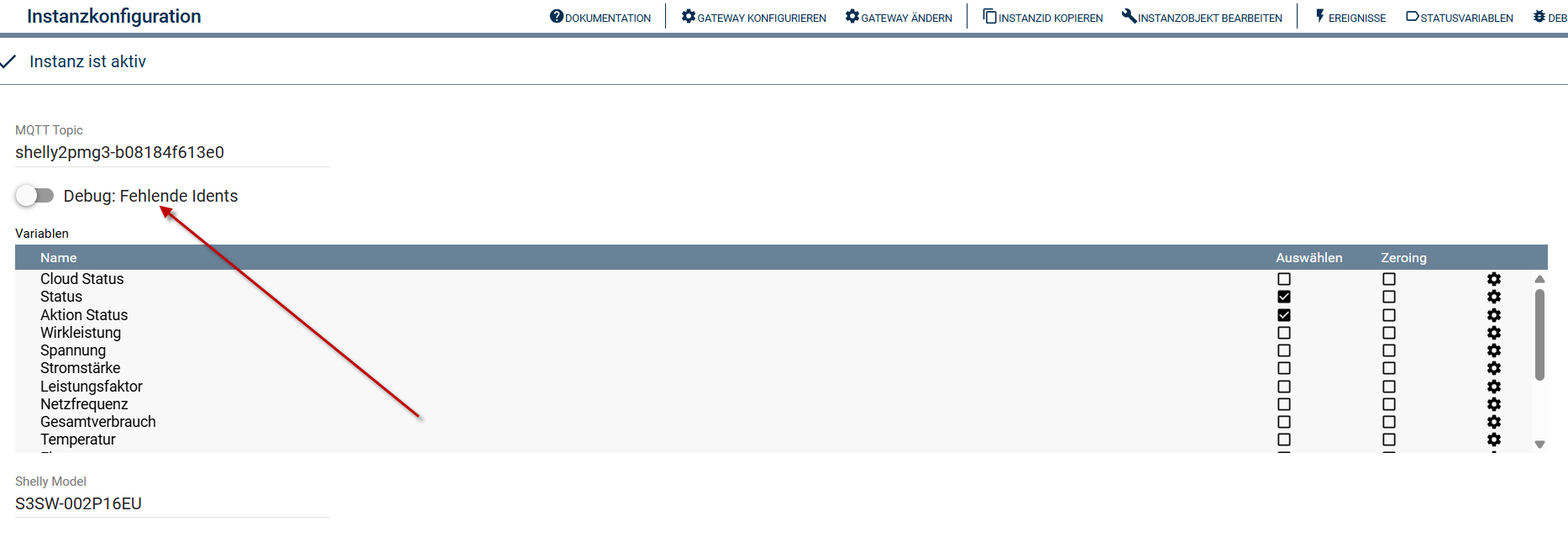
Da werden die Werte in unterschiedlichen Topics / Payloads gesendet.
Grüße,
Kai
Da werden die Werte in unterschiedlichen Topics / Payloads gesendet.
Grüße,
Kai
Du musst das leider über die Event Variable machen.
Das Modul ist so aufgebaut, dass es die Komponenten vom Shelly nutzt und das funktioniert hier leider nicht anders.
Grüße,
Kai
Hi,
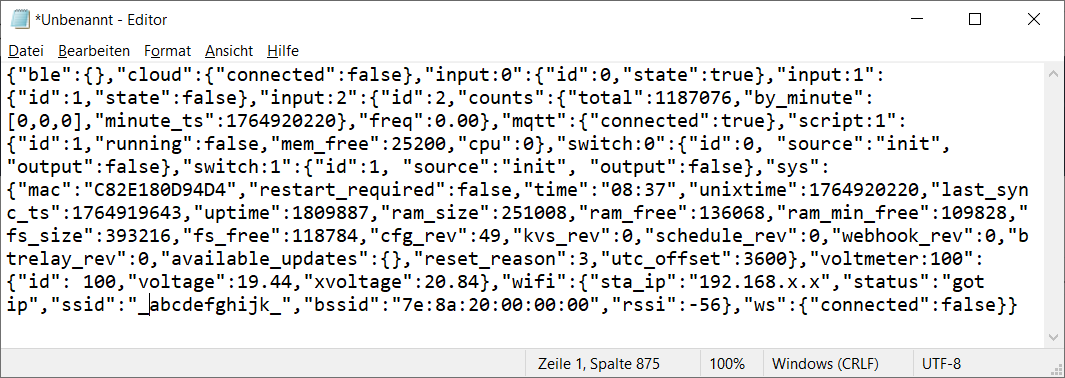
hier die Ausgabe der Statusabfrage Shelly Plus Uni:
Es fehlen z.B. ‘counts’, ‘freq’, ‘voltage’, ‘xvoltage’. Debug fehlende Idents ist an.
Grüße, Lutz
Hallo
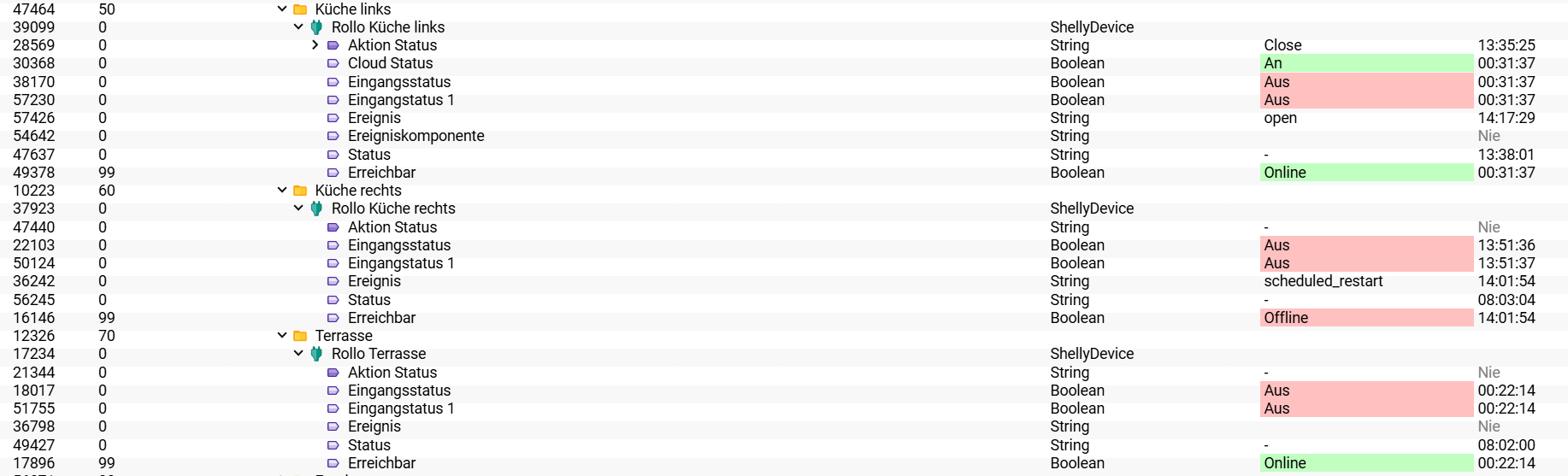
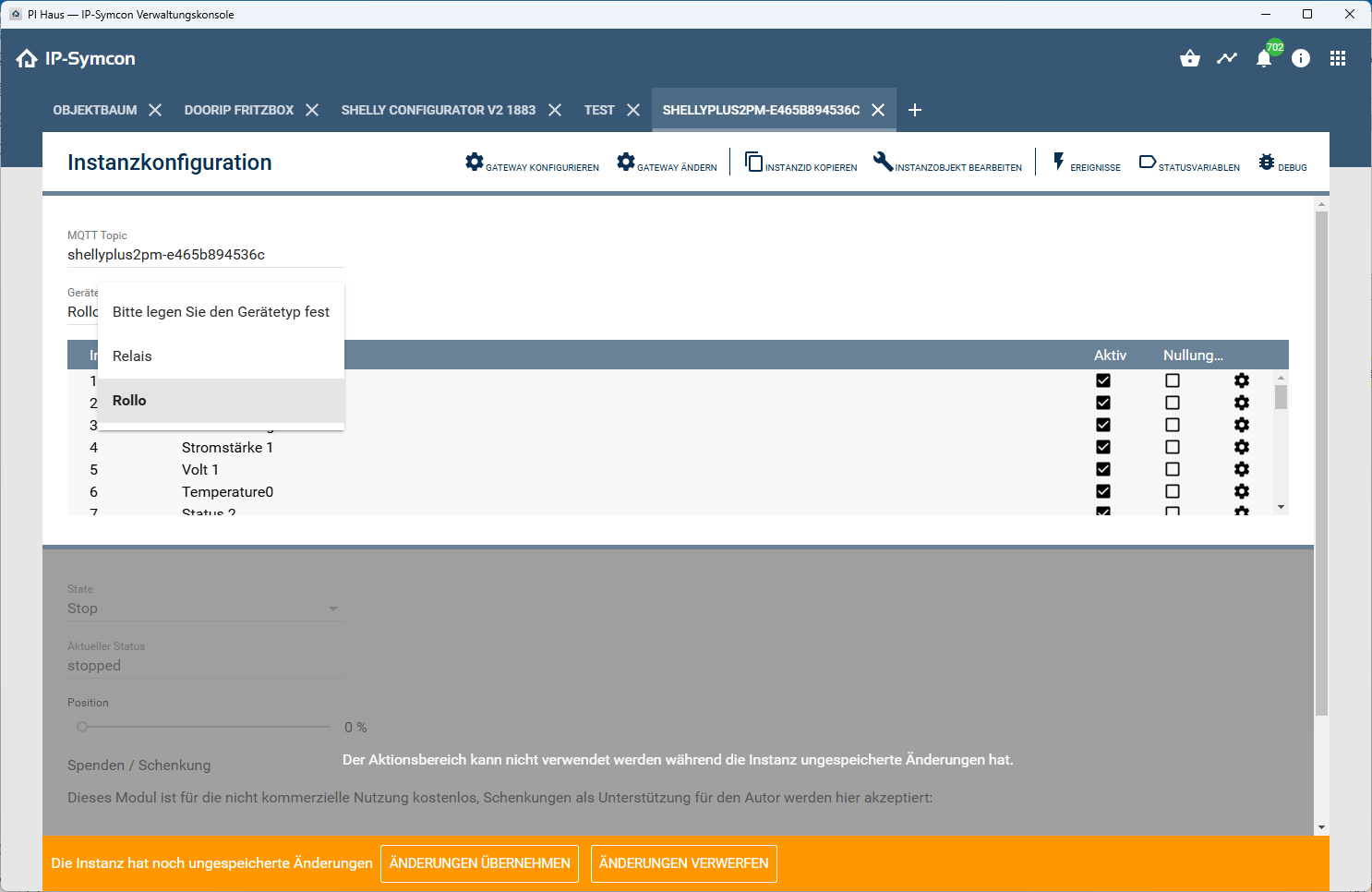
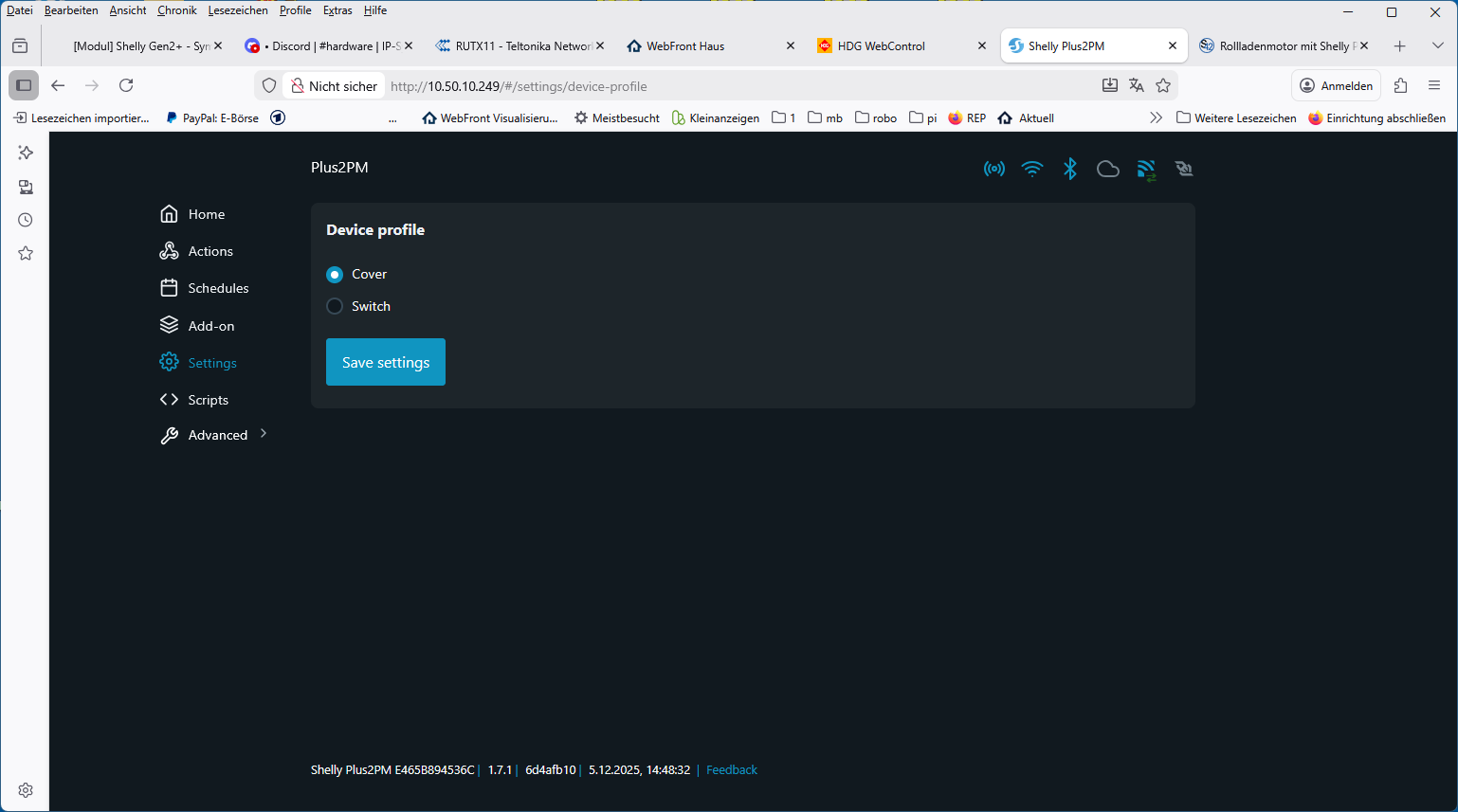
ich habe IP Symcon 8.1 mit dem Shelly Gen2+ Module. Verschiedene Shelly Geräte sind installiert und funktionieren auch gut. Nun habe ich auch ein Shelly 2PM integriert. Er ist in den Shelly Einstellungen unter als “Abdeckung” eingestellt. Im Objektbaum erscheint das Gerät, aber einen Status mit open/close gibt es nicht. Wenn das Gerät als “Schalter” installiert ist, funktionieren die beiden Schalter im Objektbaum und in der Visualisierung.
Hallo manx1,
Du musst hier die Variable Aktion Status mit Close, Stop oder Open beschreiben.
Das steuert dann den Shelly.
Moin Kai,
kannst du mir bitte auch noch eine kurze Rückmeldung geben.
Danke und Gruß Michael
Hallo chrschli
vielen Dank. Habe “close” eingegeben, dann schliesst das Rollo, so funktioniert das.
Aber wenn ich es wieder öffnen will, muss ich “open” eingeben. Ich möchte doch nicht bei jeder Aktion den Text eingeben müssen. Was mache ich da falsch oder was habe ich falsch verstanden?
Ich vermute, die nicht angezeigten Module sind alles alte Module(Gen.1).
Da solltest du das alte Shelly Modul weiternutzen.
lg Thomas
Zeig mal den Objektbaum mit der Instanz.
Sicher das es eine Shelly Instanz ist und du nicht ausversehen eine generische MQTT Geräte Instanz erstellt hast?.
Michael
Hi Thomas
nein, die verwendeten Shelly 2PM sind Gen3 und Gen4
ich sehe sie im Objektbaum, aber je nach Text im Aktion Status (close oder open) kann ich sie nur schliessen oder nur öffnen. Ich müsste eigentlich beides eingeben können, aber das geht nicht.
Die Antwort von @tomgr war nicht auf deinen Beitrag bezogen.
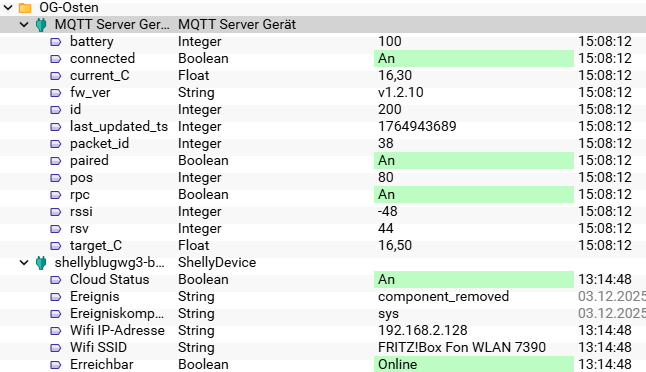
Ich habe mal ein MQTT-Gerät mit der JSON:Topic | shellyblugwg3-b08184e38cf4/status/blutrv:200 angelegt, dann kommen die aktuellen Werte:
Kai, kannst du das Modul noch erweitern?
Gruß Lutz
Wo gibst du das ein?
Die Frontends (Kachel und Webfront) sollten dir drei Schaltflächen anzeigen.
Hallo Kai,
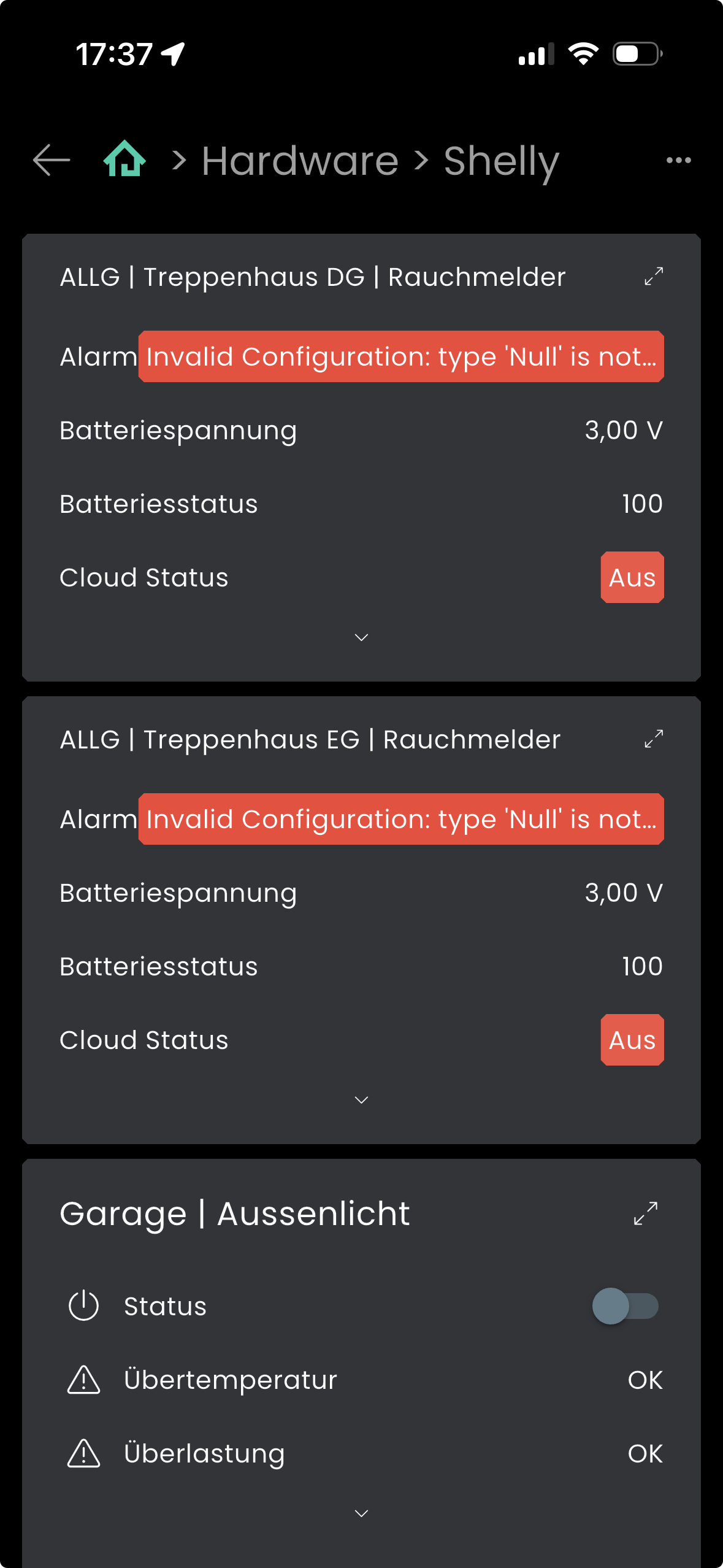
Bei meinen neuen Shelly Plus Smoke wird die “Alarm” Variable wohl nicht richtig angelegt und verursacht einen nicht abgefangen Fehler.
Mein System läuft unter Proxmox mit 8.2 Rev. 80e42ba10bc3
Jetzt bin ich mir nicht sicher ob der Fehler vom Modul oder der 8.2 kommt.
In der Kachel-Visu wird die Variable richtig angezeigt.
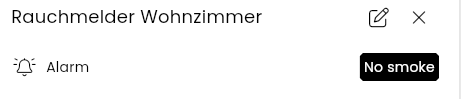
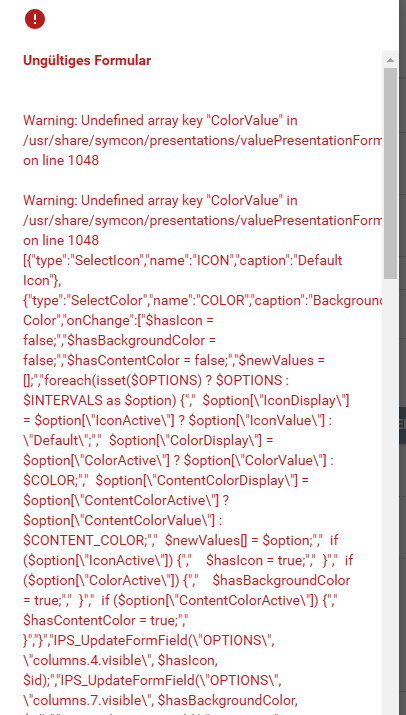
Aber wenn ich die Variable in der Konsole bearbeiten will, kommt bei der Darstellung ein Fehler.
Ungültiges Formular

Warning: Undefined array key "ColorValue" in /usr/share/symcon/presentations/valuePresentationForm.php on line 1048

Warning: Undefined array key "ColorValue" in /usr/share/symcon/presentations/valuePresentationForm.php on line 1048
[{"type":"SelectIcon","name":"ICON","caption":"Default Icon"},{"type":"SelectColor","name":"COLOR","caption":"Background Color","onChange":["$hasIcon = false;","$hasBackgroundColor = false;","$hasContentColor = false;","$newValues = [];","foreach(isset($OPTIONS) ? $OPTIONS : $INTERVALS as $option) {","  $option[\"IconDisplay\"] = $option[\"IconActive\"] ? $option[\"IconValue\"] : \"Default\";","  $option[\"ColorDisplay\"] = $option[\"ColorActive\"] ? $option[\"ColorValue\"] : $COLOR;","  $option[\"ContentColorDisplay\"] = $option[\"ContentColorActive\"] ? $option[\"ContentColorValue\"] : $CONTENT_COLOR;","  $newValues[] = $option;","  if ($option[\"IconActive\"]) {","    $hasIcon = true;","  }","  if ($option[\"ColorActive\"]) {","    $hasBackgroundColor = true;","  }","  if ($option[\"ContentColorActive\"]) {","    $hasContentColor = true;","  }","}","IPS_UpdateFormField(\"OPTIONS\", \"columns.4.visible\", $hasIcon, $id);","IPS_UpdateFormField(\"OPTIONS\", \"columns.7.visible\", $hasBackgroundColor, $id);","IPS_UpdateFormField(\"OPTIONS\", \"columns.10.visible\", $hasContentColor, $id);","IPS_UpdateFormField(\"OPTIONS\", \"values\", json_encode($newValues), $id);","IPS_UpdateFormField(\"INTERVALS\", \"values\", json_encode($newValues), $id);"]},{"type":"SelectColor","name":"CONTENT_COLOR","caption":"Text Color","onChange":["$hasIcon = false;","$hasBackgroundColor = false;","$hasContentColor = false;","$newValues = [];","foreach(isset($OPTIONS) ? $OPTIONS : $INTERVALS as $option) {","  $option[\"IconDisplay\"] = $option[\"IconActive\"] ? $option[\"IconValue\"] : \"Default\";","  $option[\"ColorDisplay\"] = $option[\"ColorActive\"] ? $option[\"ColorValue\"] : $COLOR;","  $option[\"ContentColorDisplay\"] = $option[\"ContentColorActive\"] ? $option[\"ContentColorValue\"] : $CONTENT_COLOR;","  $newValues[] = $option;","  if ($option[\"IconActive\"]) {","    $hasIcon = true;","  }","  if ($option[\"ColorActive\"]) {","    $hasBackgroundColor = true;","  }","  if ($option[\"ContentColorActive\"]) {","    $hasContentColor = true;","  }","}","IPS_UpdateFormField(\"OPTIONS\", \"columns.4.visible\", $hasIcon, $id);","IPS_UpdateFormField(\"OPTIONS\", \"columns.7.visible\", $hasBackgroundColor, $id);","IPS_UpdateFormField(\"OPTIONS\", \"columns.10.visible\", $hasContentColor, $id);","IPS_UpdateFormField(\"OPTIONS\", \"values\", json_encode($newValues), $id);","IPS_UpdateFormField(\"INTERVALS\", \"values\", json_encode($newValues), $id);"],"transparentCaption":"Default"},{"type":"Select","name":"DISPLAY_TYPE","caption":"Display type","options":[{"value":0,"caption":"Text Only"},{"value":1,"caption":"Icons Only"}]},{"type":"List","name":"OPTIONS","add":false,"delete":false,"columns":[{"name":"Value","caption":"Value","add":false,"width":"80px","edit":{"type":"Select","options":[{"value":false,"caption":"False"},{"value":true,"caption":"True"}],"enabled":false}},{"name":"Caption","caption":"Caption","add":"","width":"auto","edit":{"type":"ValidationTextBox"}},{"name":"IconActive","caption":"","edit":{"type":"CheckBox"},"add":false,"width":"0px","visible":false},{"name":"IconValue","caption":"","edit":{"type":"SelectIcon"},"add":"","width":"0px","visible":false},{"name":"IconDisplay","caption":"Icon","add":"Loading...","width":"100px","visible":false},{"name":"ColorActive","caption":"","edit":{"type":"CheckBox"},"add":false,"width":"0px","visible":false},{"name":"Color","caption":"Background Color","add":-1,"width":"100px","edit":{"type":"SelectColor"},"visible":false},{"name":"ColorDisplay","caption":"Background Color","add":-1,"width":"130px","edit":{"type":"SelectColor"},"visible":true},{"name":"ContentColorActive","caption":"","edit":{"type":"CheckBox"},"add":false,"width":"0px","visible":false},{"name":"ContentColor","caption":"Textolor","add":-1,"width":"100px","edit":{"type":"SelectColor"},"visible":false},{"name":"ContentColorDisplay","caption":"Text Color","add":-1,"width":"100px","edit":{"type":"SelectColor","transparentCaption":"Default"},"visible":false}],"form":["$edit = json_decode(\"{\\\"type\\\":\\\"Select\\\",\\\"options\\\":[{\\\"value\\\":false,\\\"caption\\\":\\\"False\\\"},{\\\"value\\\":true,\\\"caption\\\":\\\"True\\\"}],\\\"enabled\\\":false}\", true);","$edit[\"width\"] = \"100%\";","$edit[\"name\"] = \"Value\";","$edit[\"caption\"] = \"Value\";","return [","  $edit,","  [","    \"type\" => \"ValidationTextBox\",","    \"name\" => \"Caption\",","    \"caption\" => \"Caption\",","    \"width\" => \"100%\"","  ],","  [","    \"type\" => \"RowLayout\",","    \"items\" => [","      [","        \"type\" => \"CheckBox\",","        \"name\" => \"IconActive\",","        \"caption\" => \"Overwrite Icon\",","        \"width\" => \"200px\",","        \"onChange\" => 'IPS_UpdateFormField(\"IconValue\", \"visible\", $IconActive, $id);'","      ],","      [","        \"type\" => \"SelectIcon\",","        \"name\" => \"IconValue\",","        \"caption\" => \"Icon\",","        \"width\" => \"200px\",","        \"visible\" => isset($OPTIONS[\"IconActive\"]) ? $OPTIONS[\"IconActive\"] : false","      ]","    ]","  ],","  [","    \"type\" => \"RowLayout\",","    \"items\" => [","      [","        \"type\" => \"CheckBox\",","        \"name\" => \"ColorActive\",","        \"caption\" => \"Overwrite Background Color\",","        \"width\" => \"200px\",","        \"onChange\" => 'IPS_UpdateFormField(\"ColorValue\", \"visible\", $ColorActive, $id);'","      ],","      [","        \"type\" => \"SelectColor\",","        \"name\" => \"ColorValue\",","        \"caption\" => \"Background Color\",","        \"width\" => \"200px\",","        \"visible\" => isset($OPTIONS[\"ColorActive\"]) ? $OPTIONS[\"ColorActive\"] : false","      ]","    ]","  ],","  [","    \"type\" => \"RowLayout\",","    \"items\" => [","      [","        \"type\" => \"CheckBox\",","        \"name\" => \"ContentColorActive\",","        \"caption\" => \"Overwrite Text Color\",","        \"width\" => \"200px\",","        \"onChange\" => 'IPS_UpdateFormField(\"ContentColorValue\", \"visible\", $ContentColorActive, $id);'","      ],","      [","        \"type\" => \"SelectColor\",","        \"name\" => \"ContentColorValue\",","        \"caption\" => \"Text Color\",","        \"transparentCaption\" => \"Default\",","        \"width\" => \"200px\",","        \"visible\" => isset($OPTIONS[\"ContentColorActive\"]) ? $OPTIONS[\"ContentColorActive\"] : false","      ]","    ]","  ],","];"],"values":[{"IconDisplay":"Default","ColorDisplay":null,"ContentColorDisplay":-1},{"IconDisplay":"Default","ColorDisplay":null,"ContentColorDisplay":-1}],"onAdd":["$hasIcon = false;","$hasBackgroundColor = false;","$hasContentColor = false;","$newValues = [];","foreach(isset($OPTIONS) ? $OPTIONS : $INTERVALS as $option) {","  $option[\"IconDisplay\"] = $option[\"IconActive\"] ? $option[\"IconValue\"] : \"Default\";","  $option[\"ColorDisplay\"] = $option[\"ColorActive\"] ? $option[\"ColorValue\"] : $COLOR;","  $option[\"ContentColorDisplay\"] = $option[\"ContentColorActive\"] ? $option[\"ContentColorValue\"] : $CONTENT_COLOR;","  $newValues[] = $option;","  if ($option[\"IconActive\"]) {","    $hasIcon = true;","  }","  if ($option[\"ColorActive\"]) {","    $hasBackgroundColor = true;","  }","  if ($option[\"ContentColorActive\"]) {","    $hasContentColor = true;","  }","}","IPS_UpdateFormField(\"OPTIONS\", \"columns.4.visible\", $hasIcon, $id);","IPS_UpdateFormField(\"OPTIONS\", \"columns.7.visible\", $hasBackgroundColor, $id);","IPS_UpdateFormField(\"OPTIONS\", \"columns.10.visible\", $hasContentColor, $id);","IPS_UpdateFormField(\"OPTIONS\", \"values\", json_encode($newValues), $id);","IPS_UpdateFormField(\"INTERVALS\", \"values\", json_encode($newValues), $id);"],"onEdit":["$hasIcon = false;","$hasBackgroundColor = false;","$hasContentColor = false;","$newValues = [];","foreach(isset($OPTIONS) ? $OPTIONS : $INTERVALS as $option) {","  $option[\"IconDisplay\"] = $option[\"IconActive\"] ? $option[\"IconValue\"] : \"Default\";","  $option[\"ColorDisplay\"] = $option[\"ColorActive\"] ? $option[\"ColorValue\"] : $COLOR;","  $option[\"ContentColorDisplay\"] = $option[\"ContentColorActive\"] ? $option[\"ContentColorValue\"] : $CONTENT_COLOR;","  $newValues[] = $option;","  if ($option[\"IconActive\"]) {","    $hasIcon = true;","  }","  if ($option[\"ColorActive\"]) {","    $hasBackgroundColor = true;","  }","  if ($option[\"ContentColorActive\"]) {","    $hasContentColor = true;","  }","}","IPS_UpdateFormField(\"OPTIONS\", \"columns.4.visible\", $hasIcon, $id);","IPS_UpdateFormField(\"OPTIONS\", \"columns.7.visible\", $hasBackgroundColor, $id);","IPS_UpdateFormField(\"OPTIONS\", \"columns.10.visible\", $hasContentColor, $id);","IPS_UpdateFormField(\"OPTIONS\", \"values\", json_encode($newValues), $id);","IPS_UpdateFormField(\"INTERVALS\", \"values\", json_encode($newValues), $id);"]},{"type":"ExpansionPanel","caption":"Preview Chart Settings","items":[{"type":"CheckBox","name":"SHOW_PREVIEW","caption":"Show Preview"},{"type":"Select","name":"PREVIEW_STYLE","caption":"Display Style","options":[{"value":0,"caption":"Behind the value"},{"value":1,"caption":"Below the value"},{"value":2,"caption":"Above the value"}]}]}]
Kannst du das fixen?
Gruß
Alex
Hallo zusammen, das gleiche Problem habe ich auch, und in der App sieht es auch ganz komisch aus, ich nutze iOS. VG, Dominik
Das sieht bei mir ähnlich aus:
Der Slider funktioniert, aber Schaltflächen wären natürlich schöner.
In der Android-App sehe ich keine Buttons, sondern ein leeres Eingabefeld, in der Kachel-Visu kann ich per Drop-down zwischen Open, Stop und Close wählen.
Hi, also es ist in der Tat etwas unglücklich, dass das eine String Variable ist.
Da musst Du die gewünschten Befehle angeben.
Ich nutze IPSView. Dort kann man mit einem AssociationButton die drei möglichen Schaltbefehle auswählen. Finde ich aber für einen Rollladen auch etwas unschön.
Daher habe ich mir für jeden Befehl einen Ablaufplan (ohne Auslöser) erstellt.
Aktion bei Auslösung: Schalte auf Close. Entsprechend für Stop und Open.
In meiner View dann jeweils einen Button für Öffnen, Stop und Schließen.
Jeder Button löst den entsprechenden Ablaufplan aus.
Umständlich aber funktioniert.