Hallo Zusammen,
hab mich mal ein bisschen mit dem System beschäftigt und werfe mal ein paar Brocken in den Thread.
-
Bau des Gateways (Materialkosten keine €5), siehe oben oder direkt https://github.com/sidoh/esp8266_milight_hub.
-
MQTT Server in IPS aktivieren
-
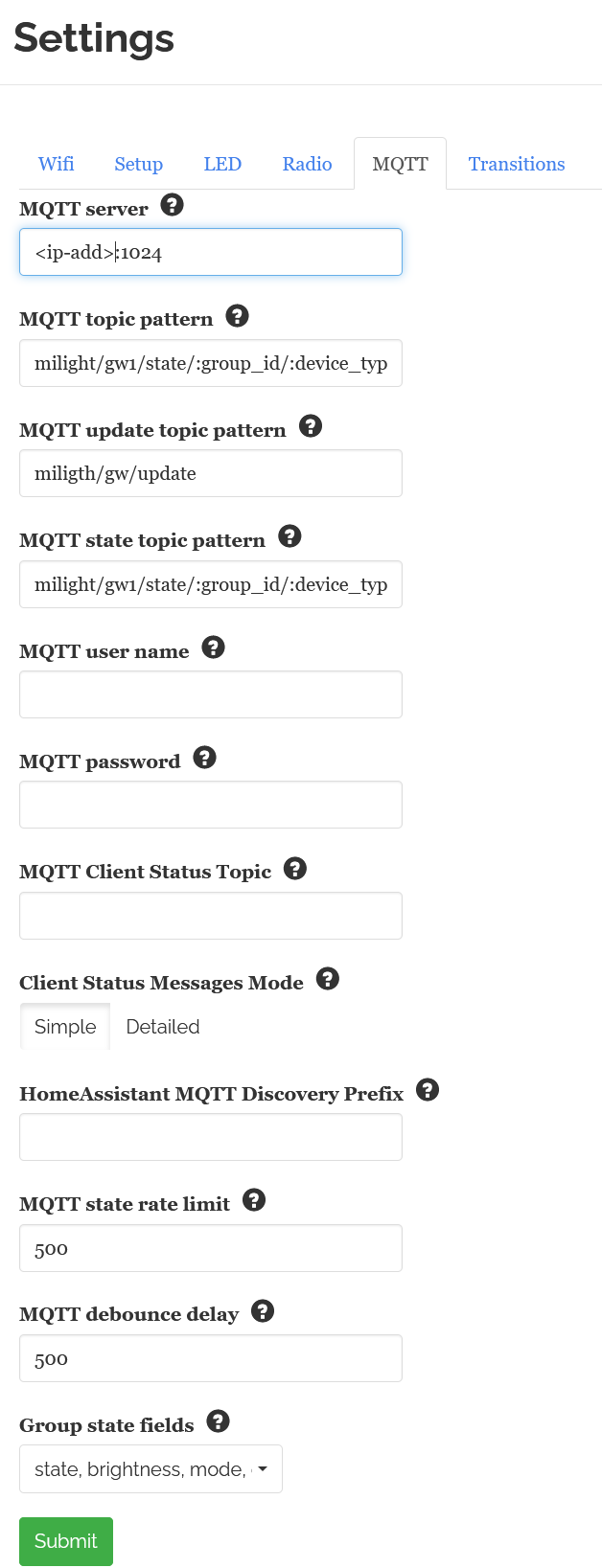
ESP-Bridge einstellen (siehe Bild esp.png)
-
Lampen an das Gateway anlernen,
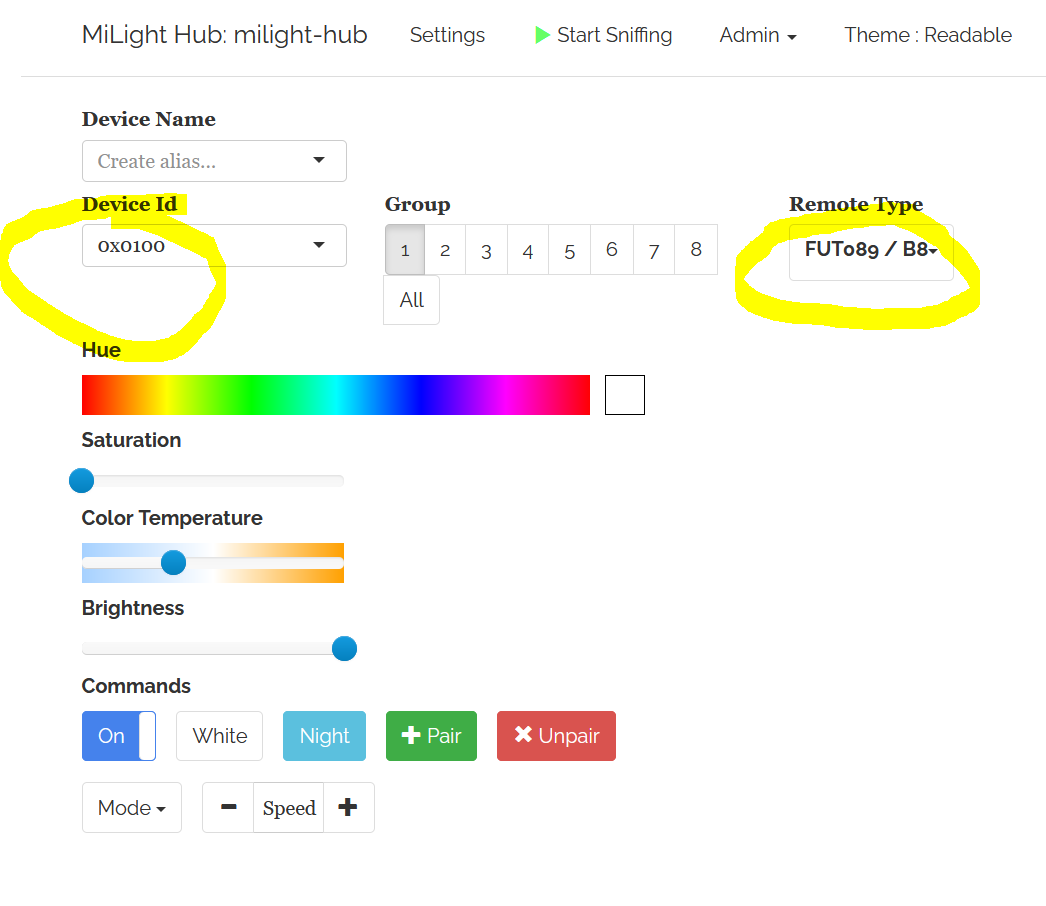
Wichtig: Jeder Lampe eine eigene ID verpassen (siehe anlern.png) und den „Remote Type“ „FUT089/B8“ auswählen, dann sind 8 Gruppen möglich. -
Die Lampen bei Bedarf an weitere Steuerelemente anlernen
-
Die Lampen mal schalten/steuern
-
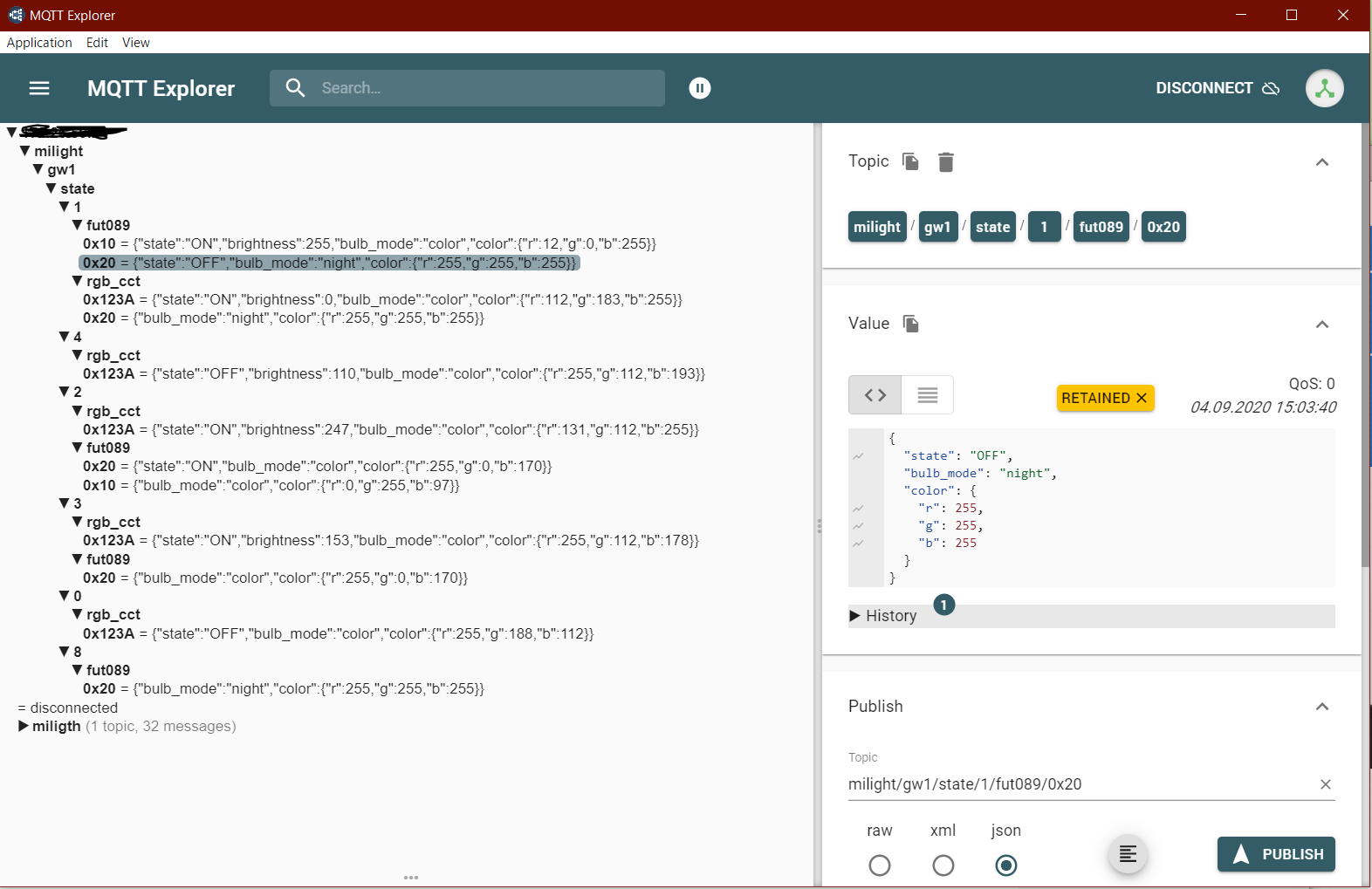
Jetzt sollte beim IPS schon was ankommen: MQTT lässt sich gut mit dem http://mqtt-explorer.com/ prüfen, einfach auf den IPS-Server zeigen lassen. (siehe mqttexplorer.png)
-
Nun im IPS mit dem MQTT Konfigurator die Instanz anlegen
Obacht! Es gibt mehrer Topics für eine Lampe:
a) die oben vergebene ID (diese wird auch zum Steuern genutzt)
b) die ID der Fernbedienung
c) ggf, mehrer Gruppen-ID
Lässt sich gut mit dem MQTT Explorer erkennen -
Nun die Variablen anlegen (siehe Bild ipsvar.png). Hier sind die Variablendefinitionen:
// Profile erstellen
// MiLiState
IPS_CreateVariableProfile("MiLiState", 1);
IPS_SetVariableProfileText("MiLiState", "", "");
IPS_SetVariableProfileValues("MiLiState", 0, 3, 1);
IPS_SetVariableProfileDigits("MiLiState", 0);
IPS_SetVariableProfileIcon("MiLiState", "");
IPS_SetVariableProfileAssociation("MiLiState", 0, "Aus", "", 16711680);
IPS_SetVariableProfileAssociation("MiLiState", 1, "Ein", "", 65280);
IPS_SetVariableProfileAssociation("MiLiState", 2, "Nacht", "", 160);
IPS_SetVariableProfileAssociation("MiLiState", 3, "Putzlicht", "", 16777215);
// MiLiBulbMode
IPS_CreateVariableProfile("MiLiBulbMode", 1);
IPS_SetVariableProfileText("MiLiBulbMode", "", "");
IPS_SetVariableProfileValues("MiLiBulbMode", 0, 0, 0);
IPS_SetVariableProfileDigits("MiLiBulbMode", 0);
IPS_SetVariableProfileIcon("MiLiBulbMode", "");
IPS_SetVariableProfileAssociation("MiLiBulbMode", 0, "White", "", -1);
IPS_SetVariableProfileAssociation("MiLiBulbMode", 1, "Color", "", -1);
IPS_SetVariableProfileAssociation("MiLiBulbMode", 2, "Scene", "", -1);
IPS_SetVariableProfileAssociation("MiLiBulbMode", 3, "Night", "", -1);
// MiLiScene
IPS_CreateVariableProfile("MiLiScene", 1);
IPS_SetVariableProfileText("MiLiScene", "", "");
IPS_SetVariableProfileValues("MiLiScene", 0, 8, 0);
IPS_SetVariableProfileDigits("MiLiScene", 0);
IPS_SetVariableProfileIcon("MiLiScene", "");
IPS_SetVariableProfileAssociation("MiLiScene", 0, "All Colors Smooth", "", -1);
IPS_SetVariableProfileAssociation("MiLiScene", 1, "White only", "", -1);
IPS_SetVariableProfileAssociation("MiLiScene", 2, "Red Green Blue smooth", "", -1);
IPS_SetVariableProfileAssociation("MiLiScene", 3, "All Colors Hard", "", -1);
IPS_SetVariableProfileAssociation("MiLiScene", 4, "All colors hard II", "", -1);
IPS_SetVariableProfileAssociation("MiLiScene", 5, "Red show", "", -1);
IPS_SetVariableProfileAssociation("MiLiScene", 6, "Green show", "", -1);
IPS_SetVariableProfileAssociation("MiLiScene", 7, "Blue show", "", -1);
IPS_SetVariableProfileAssociation("MiLiScene", 8, "White show", "", -1);
IPS_SetVariableProfileAssociation("MiLiScene", 9, "RGB Circle fade", "", -1);
// MiLiColorTemp_2
IPS_CreateVariableProfile("MiLiColorTemp_2", 1);
IPS_SetVariableProfileText("MiLiColorTemp_2", "", "");
IPS_SetVariableProfileValues("MiLiColorTemp_2", 153, 370, 25);
IPS_SetVariableProfileDigits("MiLiColorTemp_2", 0);
IPS_SetVariableProfileIcon("MiLiColorTemp_2", "");
// MiLi_Brightness
IPS_CreateVariableProfile("MiLi_Brightness", 1);
IPS_SetVariableProfileText("MiLi_Brightness", "", "");
IPS_SetVariableProfileValues("MiLi_Brightness", 0, 255, 0);
IPS_SetVariableProfileDigits("MiLi_Brightness", 0);
IPS_SetVariableProfileIcon("MiLi_Brightness", "");
- Ein Auswertescript an die benötigten Variablen setzen (bei sind es zwei Variablen):
<?php

// 0.9  2020-08-23  soe (start of engeneering)

if ($_IPS['SENDER'] == "Variable" or $_IPS['SENDER'] =='TimerEvent')
    {
   	$SenderTyp = $_IPS['SENDER'];
   	$SenderID = $_IPS['VARIABLE'];    // alt EVENT
   	}

// Variablendefinition

$BulbID         =   35518;
$BulbValue      =   47287;
$Chroma         =   35703;
$Mode           =   55368;
$White          =   43243;       // scene white color
$State          =   30279;
$Luma           =   43777;
$Scene			=	45228;  // mode 0 - 9

if ($_IPS['SENDER'] == "Variable") {                         // script wird von einer Variable getriggert
// Werte lesen
	$IN    	=    GetValue($SenderID);                       // org Bulb Value
	$json 	= 	json_decode($IN);

	// var_dump($json);      // nur zum debug, erzeugt sonst einen fehler

	// State auswerten
	IF ($json->state == "OFF" or $json->state == "off") {
        SetValue ($State, 0);

    }
	// Weitere Ablauf nur wenn Lampe an
	    IF ($json->state == "ON" or $json->state == "on") 	{
            SetValue ($State, 1);
		    SetValue ($Luma, $json->brightness);// Brightness auswerten
				// Mode auswerten
			IF ($json->bulb_mode == "white") 			{
	                        SetValue ($Chroma, 0);
				SetValue ($Mode, 0);
				SetValue ($White,$json->color_temp);
			}
			IF ($json->bulb_mode == "night")			{
				SetValue ($Mode, 3);
                SetValue ($State, 2);							// Nachtmodus
			}
			IF ($json->bulb_mode == "color")  			{
				SetValue ($Mode, 1);
				// RGB lesen, Einzelwerte nach RGB-Hex umrechnen
				$RGB = hexdec(str_pad(dechex($json->color->r),
					2,'0', STR_PAD_LEFT).str_pad(dechex($json->color->g),
					2,'0', STR_PAD_LEFT).str_pad(dechex($json->color->b),
					2,'0', STR_PAD_LEFT));
				SetValue ($Chroma, $RGB);
			}
			IF ($json->bulb_mode == "scene")  			{
				SetValue ($DebugID, $json);
				SetValue ($Mode, 2);
				IF ($json->mode == "0")  SetValue($Scene, 0);
				IF ($json->mode == "1")  SetValue($Scene, 1);
				IF ($json->mode == "2")  SetValue($Scene, 2);
				IF ($json->mode == "3")  SetValue($Scene, 3);
				IF ($json->mode == "4")  SetValue($Scene, 4);
				IF ($json->mode == "5")  SetValue($Scene, 5);
				IF ($json->mode == "6")  SetValue($Scene, 6);
				IF ($json->mode == "7")  SetValue($Scene, 7);
				IF ($json->mode == "8")  SetValue($Scene, 8);
                IF ($json->mode == "9")  SetValue($Scene, 9);
			}
		}
	exit;
	}
- Aktionsscripte an die Variablen hängen:
<?php
// Milight_Brigthness setzen
$parentID 		= 	IPS_GetObject($IPS_SELF);
$parentID 		= 	$parentID['ParentID'];
$Luma	   		= 	( $_IPS['VALUE']);
$BulbValue 		=   47287;
RequestAction ($BulbValue, "{\"state\":\"ON\",\"brightness\":\"$Luma\"}" );


<?php
//Milight_aus_Farbrad setzen
$Chroma    		= 	35703;
$BulbValue 		=   47287;
$r 				= 	(($_IPS['VALUE'] >> 16) & 0xFF);
$g 				= 	(($_IPS['VALUE'] >> 8) & 0xFF);
$b 				= 	(($_IPS['VALUE'] >> 0) & 0xFF);
RequestAction ($BulbValue, "{\"state\":\"ON\",\"color\":{\"r\":$r,\"g\":$g,\"b\":$b}}"  );


<?php
//Milight_ColorTemp
$White	    	= 	($_IPS['VALUE']);
$BulbValue 		=    47287;
RequestAction ($BulbValue, "{\"state\":\"ON\",\"color_temp\":\"$White\"}" );


<?
// Milight_State setzen
$parentID 		= 	IPS_GetObject($IPS_SELF);
$parentID 		= 	$parentID['ParentID'];
$State	    	= 	($_IPS['VALUE']);
$BulbValue 		=   47287;
if ($State == 0)    RequestAction ($BulbValue,  "{\"state\":\"OFF\"}"  );
if ($State == 1)    RequestAction ($BulbValue,  "{\"state\":\"ON\"}" );
if ($State == 2)    RequestAction ($BulbValue,  "{\"state\":\"ON\",\"command\":\"night_mode\"}" );   // Nachtlich
if ($State == 3)    RequestAction ($BulbValue,  "{\"state\":\"ON\",\"command\":\"set_white\",\"brightness\":255 }" );   // Putzlicht


<?php
//Milight_Scene
$Scene	    	= 	($_IPS['VALUE']);
$BulbValue 		=   47287;
RequestAction ($BulbValue, "{\"state\":\"ON\",\"mode\":\"$Scene\"}" );
Ein Schönheitspreis werde ich damit nicht gewinnen, aber vielleicht nützt es Euch etwas.
Bin noch am überlegen wie ich die Skalierung mache, entweder für jede Lampe/Bulb/LED-Streifen alles per Hand anlegen oder das Master-Script um eine Auswertung erweitern.
Viel Spaß am Gerät
kea