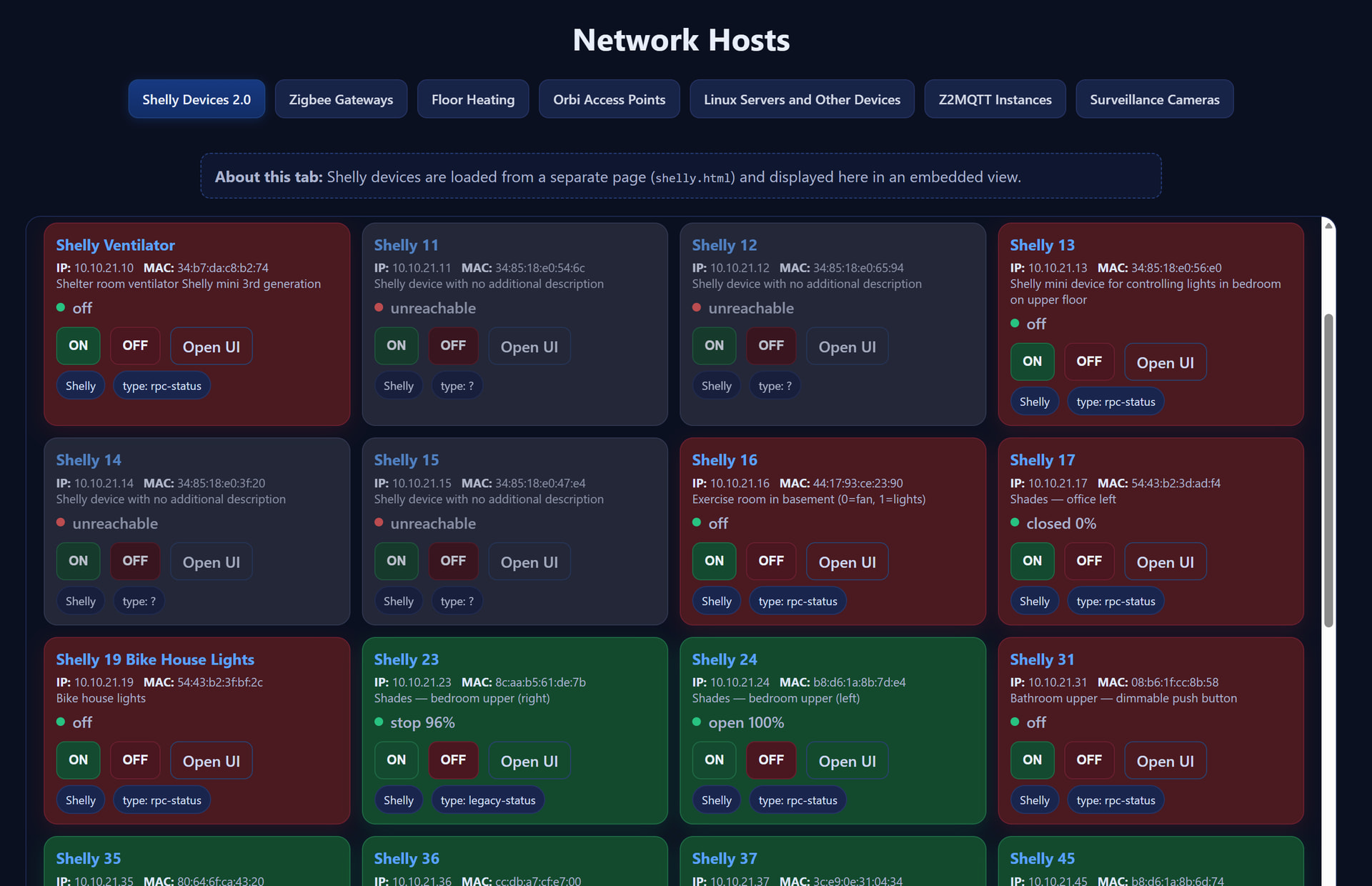
Vielleicht für den einen oder anderen interessant. Funktioniert auch unabhängig von Symcon.
Grün: ON
Rot: OFF
Violett: DOWN
<!DOCTYPE html>
<html lang="en">
<head>
<meta charset="UTF-8" />
<meta name="viewport" content="width=device-width, initial-scale=1.0"/>
<title>Shelly Devices 2.0 — Spielbrügglistrasse 4</title>
<style>
:root{
--bg:#0b1020;
--card:#121a33;
--card-alt:#0f1730;
--text:#e9eefb;
--muted:#aab3ce;
--accent:#5aa2ff;
--ok:#28c281;
--warn:#ffb020;
--err:#ff5959;
--chip:#1a254d;
--chip-border:#263567;
/* state colors for Shelly tiles */
--on-bg:#134a2d; /* green */
--on-border:#1f6b46;
--off-bg:#4a1a20; /* red */
--off-border:#6b1f2f;
--unreach-bg:#2a2f44;/* grey */
--unreach-border:#3a4264;
}
*{box-sizing:border-box}
html,body{
margin:0;padding:0;background:var(--bg);color:var(--text);
font-family:system-ui,-apple-system,Segoe UI,Roboto,Ubuntu,Cantarell,Noto Sans,"Helvetica Neue",Arial,"Apple Color Emoji","Segoe UI Emoji";
}
h1,h2{margin:18px 16px 10px}
h2{font-size:24px}
a{color:var(--accent);text-decoration:none}
a:hover{text-decoration:underline}
.note{
margin:8px auto 14px;max-width:1000px;background:#0f1730;border:1px dashed #27407f;
padding:10px 12px;border-radius:10px;color:var(--muted)
}
.toolbar{
display:flex;gap:10px;align-items:center;justify-content:space-between;
flex-wrap:wrap;margin:6px auto 12px;max-width:1000px;
}
.toolbar .group{display:flex;gap:8px;align-items:center;flex-wrap:wrap}
input[type="text"]{
background:#0f1730;border:1px solid #25366a;color:var(--text);
padding:10px 12px;border-radius:10px;min-width:260px;
}
.btn{
background:#16326b;border:1px solid #24407a;color:#eaf1ff;border-radius:9px;
padding:8px 12px;cursor:pointer;font-weight:600
}
.btn:hover{filter:brightness(1.08)}
.btn.secondary{background:#0f1730;border-color:#2a426f;color:#cdd7f1}
.btn.ghost{background:transparent;border-color:#2a426f;color:#cdd7f1}
.help{display:none;margin:0 auto 8px;max-width:1000px;color:var(--muted)}
.help.active{display:block}
.host-list{
display:grid;grid-template-columns:repeat(auto-fill,minmax(270px,1fr));gap:12px;
padding:0 18px 24px;max-width:1400px;margin:0 auto;
}
.host{
background:var(--card);border:1px solid #1d2a53;border-radius:14px;padding:12px 12px 10px;
transition:transform .12s ease, box-shadow .12s ease, background .12s ease, border-color .12s ease, opacity .12s ease, filter .12s ease;
}
.host:hover{transform:translateY(-1px);box-shadow:0 6px 24px rgba(13,60,130,.35)}
.host h3{margin:0 0 6px;font-size:16px;line-height:1.2}
.kv{font-size:12.5px;color:var(--muted)}
.kv strong{color:#dfe8ff;font-weight:700}
.status{display:flex;align-items:center;gap:8px;margin:6px 0 10px;font-weight:600}
.dot{width:9px;height:9px;border-radius:50%;background:#7789b2;display:inline-block}
.dot.ok{background:var(--ok)}
.dot.err{background:var(--err)}
.chip-row{display:flex;gap:8px;flex-wrap:wrap;margin-top:6px}
.chip{font-size:12px;border-radius:999px;background:var(--chip);border:1px solid var(--chip-border);padding:6px 9px;color:#d7e0fb}
.actions{display:flex;gap:10px;margin:8px 0 6px;flex-wrap:wrap}
.muted{color:var(--muted)}
/* Shelly control buttons */
.btn.on{background:#144a2f;border-color:#1f6b46}
.btn.off{background:#4a1620;border-color:#6b1f2f}
.btn.stop{background:#45300f;border-color:#6f4b17}
/* state backgrounds for Shelly 2.0 cards */
.host.state-on{
background:var(--on-bg); border-color:var(--on-border);
box-shadow:0 6px 20px rgba(21,120,70,.25);
}
.host.state-off{
background:var(--off-bg); border-color:var(--off-border);
box-shadow:0 6px 20px rgba(150,35,45,.20);
}
.host.state-unreachable{
background:var(--unreach-bg); border-color:var(--unreach-border);
filter:grayscale(.15) brightness(.92); opacity:.85;
box-shadow:none;
}
footer{
color:#7382a8;text-align:center;margin:6px 0 10px;font-size:11px;
}
</style>
<script>
// ---------- Shelly 2.0 logic (proxied via /shelly/<ip>/...) ----------
let shelly2Initialized=false;
const shellyDevices=[
{ip:'10.10.21.10', name:'Shelly Ventilator', mac:'34:b7:da:c8:b2:74', desc:'Shelter room ventilator Shelly mini 3rd generation'},
{ip:'10.10.21.11', name:'Shelly 11', mac:'34:85:18:e0:54:6c', desc:'Shelly device with no additional description'},
{ip:'10.10.21.12', name:'Shelly 12', mac:'34:85:18:e0:65:94', desc:'Shelly device with no additional description'},
{ip:'10.10.21.13', name:'Shelly 13', mac:'34:85:18:e0:56:e0', desc:'Shelly mini device for controlling lights in bedroom on upper floor'},
{ip:'10.10.21.14', name:'Shelly 14', mac:'34:85:18:e0:3f:20', desc:'Shelly device with no additional description'},
{ip:'10.10.21.15', name:'Shelly 15', mac:'34:85:18:e0:47:e4', desc:'Shelly device with no additional description'},
{ip:'10.10.21.16', name:'Shelly 16', mac:'44:17:93:ce:23:90', desc:'Exercise room in basement (0=fan, 1=lights)'},
{ip:'10.10.21.17', name:'Shelly 17', mac:'54:43:b2:3d:ad:f4', desc:'Shades — office left'},
{ip:'10.10.21.19', name:'Shelly 19 Bike House Lights', mac:'54:43:b2:3f:bf:2c', desc:'Bike house lights'},
{ip:'10.10.21.23', name:'Shelly 23', mac:'8c:aa:b5:61:de:7b', desc:'Shades — bedroom upper (right)'},
{ip:'10.10.21.24', name:'Shelly 24', mac:'b8:d6:1a:8b:7d:e4', desc:'Shades — bedroom upper (left)'},
{ip:'10.10.21.31', name:'Shelly 31', mac:'08:b6:1f:cc:8b:58', desc:'Bathroom upper — dimmable push button'},
{ip:'10.10.21.35', name:'Shelly 35', mac:'80:64:6f:ca:43:20', desc:'Shades — office right'},
{ip:'10.10.21.36', name:'Shelly 36', mac:'cc:db:a7:cf:e7:00', desc:'Blinds — bathroom upper'},
{ip:'10.10.21.37', name:'Shelly 37', mac:'3c:e9:0e:31:04:34', desc:'Blinds — walk-in closet'},
{ip:'10.10.21.45', name:'Shelly 45', mac:'b8:d6:1a:8b:6d:74', desc:'Shades — office middle'},
{ip:'10.10.21.54', name:'Shelly 54', mac:'34:b7:da:8f:66:90', desc:'Kitchen lights (likely)'},
{ip:'10.10.21.56', name:'Shelly 56', mac:'34:b7:da:8d:f5:04', desc:'Hobby room GF — mini spots'},
{ip:'10.10.21.57', name:'Shelly 57', mac:'dc:da:0c:b0:d0:d0', desc:'Shelter room basement — spots'},
{ip:'10.10.21.58', name:'Shelly 58', mac:'dc:da:0c:b0:d0:d0', desc:'Cosmetic mirror'},
{ip:'10.10.21.59', name:'Shelly 59', mac:'54:32:04:52:18:78', desc:'Cooking island — blue light'}
];
function lazyInitShelly2(){
if(shelly2Initialized) return;
shelly2Initialized=true;
const list=document.getElementById('shelly2-list');
list.innerHTML = shellyDevices.map((d,idx)=> cardHTML(d, idx)).join('');
attachShellyHandlers();
pollAllShelly();
}
function cardHTML(d, idx){
const ui = `http://${d.ip}`;
return `<div class="host state-unreachable" id="card-${idx}" data-ip="${d.ip}" data-idx="${idx}">
<h3><a href="${ui}" target="_blank" rel="noopener">${escapeHtml(d.name)}</a></h3>
<div class="kv"><strong>IP:</strong> ${d.ip} <strong>MAC:</strong> ${escapeHtml(d.mac || '—')}</div>
<div class="kv"><span class="muted">${escapeHtml(d.desc || '')}</span></div>
<div class="status"><span class="dot" id="dot-${idx}"></span><span id="stat-${idx}" class="muted">checking…</span></div>
<div class="actions" id="actions-${idx}">
<button class="btn on" data-action="on" data-idx="${idx}" disabled>ON</button>
<button class="btn off" data-action="off" data-idx="${idx}" disabled>OFF</button>
<a class="btn ghost" href="${ui}" target="_blank" rel="noopener">Open UI</a>
</div>
<div class="chip-row">
<span class="chip">Shelly</span>
<span class="chip" id="type-${idx}">type: ?</span>
</div>
</div>`;
}
function setCardState(idx, stateClass){
const card=document.getElementById('card-'+idx);
if(!card) return;
card.classList.remove('state-on','state-off','state-unreachable');
card.classList.add(stateClass);
}
function attachShellyHandlers(){
const list=document.getElementById('shelly2-list');
list.addEventListener('click', async (ev)=>{
const btn=ev.target.closest('button[data-action]');
if(!btn) return;
const idx=parseInt(btn.dataset.idx,10);
const action=btn.dataset.action;
// handle STOP explicitly for Cover devices
if(action==='stop'){ await setShelly(idx, null); }
else { await setShelly(idx, action==='on'); }
// re-poll after change
setTimeout(()=>pollShelly(idx), 500);
});
document.getElementById('poll-all').addEventListener('click', pollAllShelly);
document.getElementById('toggle-help').addEventListener('click',()=>{
document.getElementById('shelly-help').classList.toggle('active');
});
document.getElementById('filter').addEventListener('input', (e)=>{
const q=e.target.value.trim().toLowerCase();
const cards=[...document.querySelectorAll('#shelly2-list .host')];
cards.forEach(card=>{
const idx=card.dataset.idx|0;
const d=shellyDevices[idx];
const hay=[d.name,d.desc,d.ip,d.mac].join(' ').toLowerCase();
card.style.display = hay.includes(q) ? '' : 'none';
});
// update visible count
const visible=[...document.querySelectorAll('#shelly2-list .host')].filter(el=>el.style.display!=='none');
document.getElementById('device-count').textContent=`${visible.length} device(s)`;
});
}
function fetchWithTimeout(resource, options={}){
const { timeout=5000 } = options;
return new Promise((resolve, reject) => {
const id=setTimeout(() => reject(new Error('timeout')), timeout);
fetch(resource, {...options, cache:'no-store'}).then((response)=>{
clearTimeout(id); resolve(response);
},(err)=>{ clearTimeout(id); reject(err); });
});
}
function displayStatus(idx, ok, text, type, isOn){
const dot=document.getElementById('dot-'+idx);
const stat=document.getElementById('stat-'+idx);
const actions=document.getElementById('actions-'+idx);
const typeEl=document.getElementById('type-'+idx);
if(!dot || !stat || !actions || !typeEl) return;
if(ok){
dot.classList.add('ok'); dot.classList.remove('err');
stat.textContent=text||'online';
setCardState(idx, isOn ? 'state-on' : 'state-off');
}else{
dot.classList.add('err'); dot.classList.remove('ok');
stat.textContent=text||'unreachable';
setCardState(idx, 'state-unreachable');
}
typeEl.textContent='type: '+(type||'?');
// enable/disable controls
const enable = ok && (type==='Switch' || type==='Relay' || type==='Light' || type==='Cover');
actions.querySelectorAll('button').forEach(b=>b.disabled=!enable);
// Adapt controls for Cover devices
const onBtn=actions.querySelector('button.on');
const offBtn=actions.querySelector('button.off');
if(type==='Cover'){
onBtn.textContent='OPEN';
offBtn.textContent='CLOSE';
if(!actions.querySelector('button.stop')){
const stop=document.createElement('button');
stop.className='btn stop'; stop.textContent='STOP'; stop.dataset.idx=idx; stop.dataset.action='stop';
actions.insertBefore(stop, offBtn);
}
}else{
onBtn.textContent='ON';
offBtn.textContent='OFF';
const stopBtn=actions.querySelector('button.stop');
if(stopBtn) stopBtn.remove();
}
}
async function detectAndGetStatus(ip){
// New strategy:
// 1) Try /rpc/Shelly.GetStatus (Gen2 / Gen3)
// 2) If that fails, try /status (Gen1 / legacy)
const rpcUrl = `/shelly/${ip}/rpc/Shelly.GetStatus`;
const statusUrl = `/shelly/${ip}/status`;
// --- 1) Gen2/Gen3: /rpc/Shelly.GetStatus ---
try {
const r = await fetchWithTimeout(rpcUrl, {
timeout: 4500,
headers: { 'Accept': 'application/json' }
});
if (r.ok) {
const text = await r.text();
try {
const json = JSON.parse(text);
console.debug(`Shelly ${ip} Shelly.GetStatus: OK`, json);
return { ok: true, type: 'rpc-status', json };
} catch (e) {
console.warn(`Shelly ${ip} Shelly.GetStatus: JSON parse failed`, e, text.slice(0, 200));
}
} else {
console.warn(`Shelly ${ip} Shelly.GetStatus: HTTP ${r.status} ${r.statusText}`);
}
} catch (e) {
console.warn(`Shelly ${ip} Shelly.GetStatus: fetch error`, e);
}
// --- 2) Gen1: /status ---
try {
const r2 = await fetchWithTimeout(statusUrl, {
timeout: 4500,
headers: { 'Accept': 'application/json' }
});
if (r2.ok) {
const text2 = await r2.text();
try {
const json2 = JSON.parse(text2);
console.debug(`Shelly ${ip} /status: OK`, json2);
return { ok: true, type: 'legacy-status', json: json2 };
} catch (e2) {
console.warn(`Shelly ${ip} /status: JSON parse failed`, e2, text2.slice(0, 200));
}
} else {
console.warn(`Shelly ${ip} /status: HTTP ${r2.status} ${r2.statusText}`);
}
} catch (e2) {
console.warn(`Shelly ${ip} /status: fetch error`, e2);
}
console.warn(`Shelly ${ip}: all status methods failed`);
return { ok: false, type: null, json: null };
}
function parseState(type, json){
if (!json) return { on:false, label:'unreachable' };
// ----- Gen2/3 aggregated status from Shelly.GetStatus -----
// Look for keys like "switch:0", "light:0", "cover:0", etc.
if (json['switch:0']) {
const s = json['switch:0'];
const on = !!(s.output ?? s.on);
return { on, label: on ? 'on' : 'off' };
}
if (json['light:0']) {
const l = json['light:0'];
const on = !!(l.output ?? l.on ?? l.ison);
if ('brightness' in l && l.brightness != null) {
return { on, label: on ? `on (${l.brightness}%)` : 'off' };
}
return { on, label: on ? 'on' : 'off' };
}
if (json['cover:0'] || json.rollers) {
const c = json['cover:0'] || (json.rollers && json.rollers[0]) || {};
const state = (c.state || '').toString().toLowerCase();
const pos = (c.current_pos != null) ? ` ${c.current_pos}%` : '';
const on = (state === 'open' || state === 'opening' || (c.current_pos > 0));
return { on, label: state ? `${state}${pos}` : (on ? 'open' : 'closed') };
}
// dimmer-like structures
if (json['dimmer:0']) {
const d = json['dimmer:0'];
const on = !!(d.output ?? d.on ?? d.ison);
if ('brightness' in d && d.brightness != null) {
return { on, label: on ? `on (${d.brightness}%)` : 'off' };
}
return { on, label: on ? 'on' : 'off' };
}
// ----- Gen1 / legacy /status response -----
if (json.relays && json.relays.length) {
const on = !!json.relays[0].ison;
return { on, label: on ? 'on' : 'off' };
}
// Fallback: device is reachable but we don't know the specific state
return { on:false, label:'online' };
}
async function pollShelly(idx){
const d=shellyDevices[idx];
const res = await detectAndGetStatus(d.ip);
if(res.ok){
const state=parseState(res.type,res.json);
d._type=res.type;
displayStatus(idx,true,state.label,res.type,state.on);
return true;
}else{
displayStatus(idx,false,'unreachable',null,false);
return false;
}
}
async function pollAllShelly(){
const indices=shellyDevices.map((_,i)=>i);
await Promise.all(indices.map(i=>pollShelly(i).catch(()=>{})));
const visible=[...document.querySelectorAll('#shelly2-list .host')].filter(el=>el.style.display!=='none');
const countEl=document.getElementById('device-count');
if(countEl) countEl.textContent=`${visible.length} device(s)`;
}
async function setShelly(idx, turnOn){
const d=shellyDevices[idx];
if(!d._type){
const res = await detectAndGetStatus(d.ip);
if(!res.ok) { displayStatus(idx,false,'unreachable',null,false); return; }
d._type=res.type;
}
const ip=d.ip;
const base=(path)=>`/shelly/${ip}${path}`;
let urls=[];
if(d._type==='Switch'){
urls=[ base(`/rpc/Switch.Set?id=0&on=${turnOn}`) ];
}else if(d._type==='Relay'){
urls=[ base(`/rpc/Relay.Set?id=0&on=${turnOn}`) ];
}else if(d._type==='Light'){
urls=[ base(`/rpc/Light.Set?id=0&on=${turnOn}`) ];
}else if(d._type==='Cover'){
if(turnOn===null){ urls=[ base('/rpc/Cover.Stop?id=0') ]; }
else if(turnOn){ urls=[ base('/rpc/Cover.Open?id=0') ]; }
else{ urls=[ base('/rpc/Cover.Close?id=0') ]; }
}else{
urls=[ base(`/rpc/Switch.Set?id=0&on=${turnOn}`), base(`/rpc/Relay.Set?id=0&on=${turnOn}`), base(`/rpc/Light.Set?id=0&on=${turnOn}`) ];
}
for(const u of urls){
try{
const r=await fetchWithTimeout(u,{timeout:6000, headers:{'Accept':'application/json'}});
if(r.ok) return;
}catch(_e){ /* try next */ }
}
}
function escapeHtml(s){
return (s??'').toString()
.replaceAll('&','&').replaceAll('<','<').replaceAll('>','>')
.replaceAll('"','"').replaceAll("'","'");
}
document.addEventListener('DOMContentLoaded', ()=>{
lazyInitShelly2();
});
</script>
</head>
<body>
<h2>Shelly Devices 2.0</h2>
<div class="note">
<strong>About this view:</strong> All Shelly API calls are routed through
<code>/shelly/<ip>/...</code> on <em>home.lan</em> (nginx reverse-proxy) so the browser never hits
the devices directly. This avoids CORS issues and allows polling & toggling from inside the iframe.
</div>
<div class="toolbar">
<div class="group">
<input id="filter" type="text" placeholder="Filter by description/IP/MAC…" />
<button class="btn" id="poll-all" title="Poll status of all devices">Poll all</button>
<span class="muted" id="device-count"></span>
</div>
<div class="group">
<button class="btn secondary" id="toggle-help">Help</button>
</div>
</div>
<div id="shelly-help" class="help">
<ul>
<li><strong>ON/OFF</strong> uses <code>Switch.Set</code>, <code>Relay.Set</code> or <code>Light.Set</code> depending on device type. For shutter controllers (<code>Cover.*</code>), the controls change to <em>OPEN</em>/<em>STOP</em>/<em>CLOSE</em>.</li>
<li>If a tile shows <em>unreachable</em>, ensure the device responds to its RPC API on the LAN and that nginx exposes <code>/shelly/<ip>/...</code> to it.</li>
</ul>
</div>
<div id="shelly2-list" class="host-list" aria-live="polite"></div>
<footer>Shelly dashboard embedded in AA's home network dashboard</footer>
</body>
</html>
Perfekte Idee für eine schöne Übersicht. Vielen Dank dafür, die kann ich gut gebrauchen.
Ich habe es bei mir mit einem Eintrag probiert, aber leider bekomme ich keine Verbindung. Lediglich Open UI funktioniert.
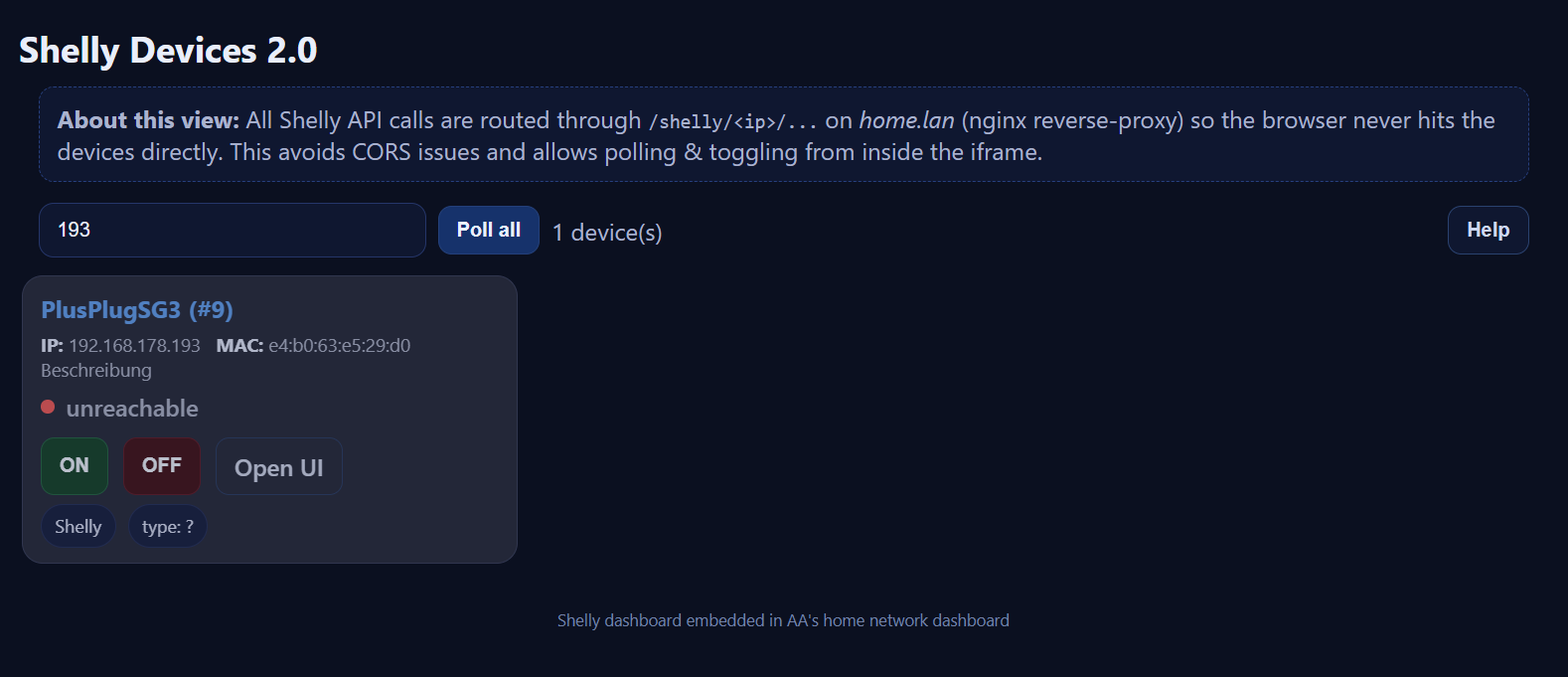
In der Console sehe ich

Ich habe den Inhalt in eine Datei kopiert und rufe sie mit einem Doppelklick auf. Irgendetwas übersehe ich wohl. Hast du da einen Tipp?
Du hast sicher die IP Adressen deiner Shellies angepasst, oder? ich habe ein Nginx Reverse Proxy serverblock eingerichtet, damit das Problem mit dem cross-site nicht auftritt.
  # Root directory for the SPA / dashboard
    root /var/www/home.lan;
    index index.html index.php;

    # ----------------------------------------------------------------------
    # SPA / main dashboard
    # ----------------------------------------------------------------------
    location / {
        try_files $uri $uri/ /index.html;
    }

    # ----------------------------------------------------------------------
    # Shelly reverse proxy: /shelly/<ip>/path -> http://<ip>/path
    # Example: /shelly/10.10.21.10/rpc/Switch.GetStatus?id=0
    #          -> http://10.10.21.10/rpc/Switch.GetStatus?id=0
    # ----------------------------------------------------------------------
    location ~ ^/shelly/(?<device_ip>\d+\.\d+\.\d+\.\d+)(?<device_path>/.*)$ {

        # CORS / preflight (if you ever need cross-origin access)
        if ($request_method = OPTIONS) {
            add_header Access-Control-Allow-Origin * always;
            add_header Access-Control-Allow-Methods "GET, POST, OPTIONS" always;
            add_header Access-Control-Allow-Headers "*" always;
            return 204;
        }

        # Proxy to the Shelly device
        proxy_pass http://$device_ip$device_path;

        proxy_http_version 1.1;
        proxy_set_header Host $device_ip;
        proxy_set_header X-Real-IP $remote_addr;
        proxy_set_header X-Forwarded-For $proxy_add_x_forwarded_for;
        proxy_set_header X-Forwarded-Proto $scheme;

        proxy_connect_timeout 5s;
        proxy_read_timeout 10s;
        proxy_send_timeout 10s;

        proxy_set_header Connection "";
        proxy_buffering off;

        # Allow JS to read responses if you ever use a different origin
        add_header Access-Control-Allow-Origin * always;
        add_header Access-Control-Expose-Headers "*" always;
    }
Ja genau. Ich dachte, mehr wäre nicht zu tun.
Den Proxy muss ich mir mal bei Gelegenheit anschauen. Aber da ich da nicht so sehr drinstecke, werde ich wohl lieber die Finger davon lassen😃
Trotzdem danke, dass du deine Lösung vorgestellt hast!
1 „Gefällt mir“
Sieht ganz toll aus. Etwas ähnliches suche ich schon lange, um über eine einfache lokale Webseite, alle meine Shellies darzustellen und mit den einfachsten Funktionen (ein/aus) zu bedienen.
Im Moment scheitere ich allerdings bei Deiner Lösung an dem Reverse Proxy. Ich schaffe es einfach nicht den in meinem Webserver (Lighttpd) zu installieren. Ich bin leider allerdings auch überhaupt kein Fachmann für Webserver oder auch für Erstellung von Webseiten. Ich bin schon froh dass der Webserver irgendwie läuft 
Nach einigen Stunden mit nachschlagen, ausprobieren … funktioniert das ganze denn nicht ohne einen Reverse Proxy ? Ich schaffe es aber auch nicht den Code so umzustellen.
Das Problem ist dass moderne Browsers keine Cross-Sites erlauben, um scams vorzubeugen. Und jedes Shelly hat seine eigene IP-Addresse. Damit alles unter der gleichen Site läuft, muss es geproxied werden. Ist aber nicht schwer, du kannst obigen Serverblock in ChatGPT eingeben und bitten, ihn zurechtzuschneiden (ist aber für nginx, was für reverse-proxying m.E. das beste ist).
Vielen Dank, wieder was gelernt !
Ich versuche es mal mit ChatGPT. Und dann vielleicht mal mit dem nginx Server
Ok…es hat soweit funktioniert mit einem zusätzlichem Nginx Reverse Proxy. Der Status wird angezeigt, die links zum Open UI funktionieren auch.
Aber haben die ON/OFF Buttons eine Funktion ? Egal was ich mache und drücke, da passiert nichts.
ah ja, das stimmt. Ich glaube, ich hatte mir eventuell nur eingebildet, die Buttons einprogrammiert zu haben…  Ich benutze es vor allem, um Erreichbarkeit und Status zu visualisieren. Es sollte aber nicht allzu schwer sein, die Funktion zu implementieren.
Ich sehe da keine Chance für mich das zu implementieren…dafür kenne ich mich zuwenig mit HTML/JAVA aus.
Aber auf jeden Fall danke für die gute Idee mit der Übersicht !