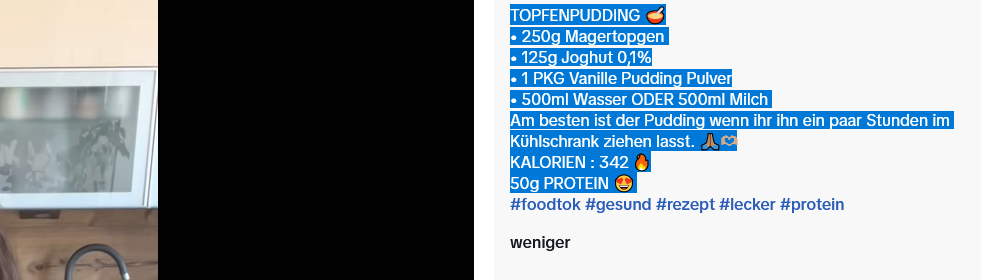
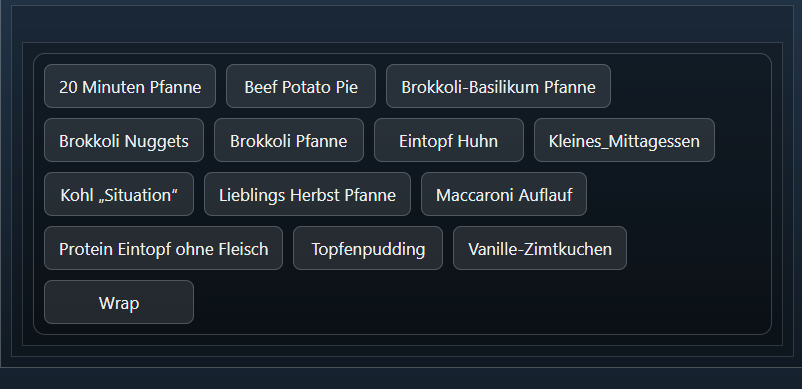
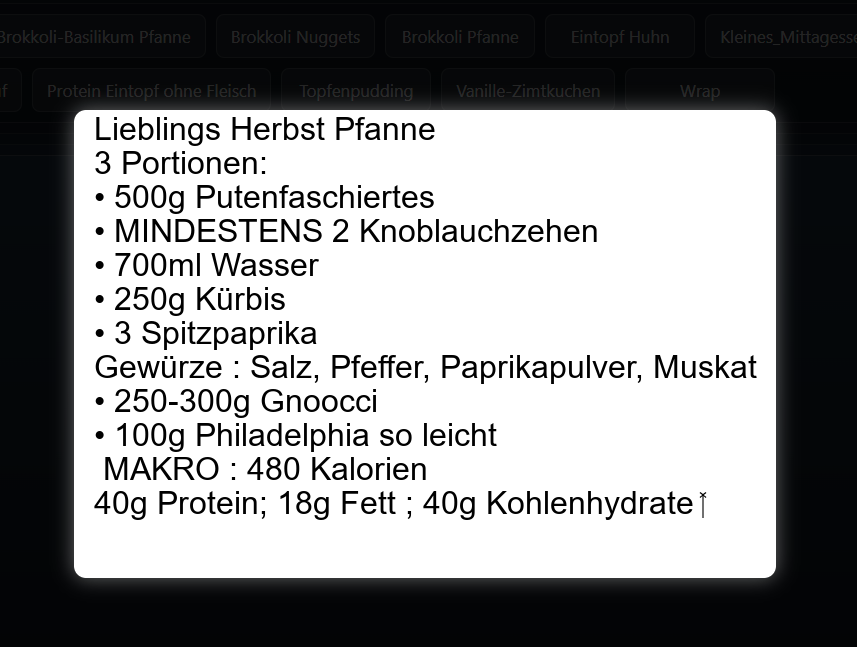
ich hole mir meine Rezepte vielfach ab Tiktok. Es braucht eine Html-String-Variable und ein Txt-File Namens rezept.txt. Dort wird das Rezept aus Tiktok eingefügt. Danach für jedes neue Rezept das Script laufen lassen. Pfadangabe und Stringvariable im Script anpassen.
<?php
// Pfad zur Textdatei
$txtFile = 'C:/ProgramData/Symcon/user/Rezepte/rezept.txt';
$rezeptVar = 26395;
// Text aus der Datei lesen
if (!file_exists($txtFile)) {
die("Textdatei nicht gefunden: $txtFile");
}
// Ganze Datei einlesen
$textContent = file_get_contents($txtFile);
// Emojis und Sonderzeichen entfernen (Unicode-Emojis)
$textContent = preg_replace('/[\x{1F300}-\x{1FAFF}\x{1F600}-\x{1F64F}\x{1F680}-\x{1F6FF}\x{2600}-\x{26FF}\x{2700}-\x{27BF}]/u', '', $textContent);
// Zeilenweise in Array aufteilen
$textLines = preg_split("/\r\n|\n|\r/", $textContent);
// Datei-Name aus erster Zeile generieren (Leerzeichen beibehalten, nur verbotene Zeichen entfernen)
$firstLine = $textLines[0] ?? "Rezept";
$filenameSafe = preg_replace('/[\/\\\\:*?"<>|]/', '', $firstLine);
$outputImage = "C:/ProgramData/Symcon/user/Rezepte/{$filenameSafe}.png";
// Schriftart
$fontPath = 'C:/Windows/Fonts/arial.ttf';
$fontSize = 24;
// Ränder und Zeilenabstand
$paddingTop = 30;
$paddingLeft = 20;
$paddingRight = 20;
$lineSpacing = 10;
// Breite dynamisch berechnen
$maxWidth = 0;
foreach ($textLines as $line) {
$bbox = imagettfbbox($fontSize, 0, $fontPath, $line);
$textWidth = $bbox[2] - $bbox[0];
if ($textWidth > $maxWidth) $maxWidth = $textWidth;
}
// Gesamte Bildbreite
$width = $paddingLeft + $maxWidth + $paddingRight;
// Höhe dynamisch berechnen
$height = $paddingTop + count($textLines) * ($fontSize + $lineSpacing) + $paddingTop;
// Neues Bild erstellen
$image = imagecreatetruecolor($width, $height);
// Farben definieren
$white = imagecolorallocate($image, 255, 255, 255);
$black = imagecolorallocate($image, 0, 0, 0);
imagefill($image, 0, 0, $white);
// Textzeilen zeilenweise schreiben
$y = $paddingTop;
foreach ($textLines as $line) {
imagettftext($image, $fontSize, 0, $paddingLeft, $y, $black, $fontPath, $line);
$y += $fontSize + $lineSpacing;
}
// Bild speichern
imagepng($image, $outputImage);
imagedestroy($image);
IPS_RunScript(53374);
//echo "Text erfolgreich aus der TXT-Datei als PNG gespeichert: $outputImage";
$dir = IPS_GetKernelDir() . "user\\Rezepte\\";
$files = scandir($dir);
$html = <<<HTML
<style>
.list-container {
max-height: 400px; /* Höhe der Galerie */
overflow-y: auto; /* Scrollbar bei Bedarf */
padding: 10px;
border: 1px solid rgba(255,255,255,0.2);
border-radius: 12px;
background-color: rgba(0,0,0,0.1); /* leichter Hintergrund */
}
.list {
display: flex;
flex-wrap: wrap; /* Kacheln umbrechen */
gap: 10px;
font-family: system-ui, sans-serif;
}
.item {
flex: 0 1 auto;
min-width: 120px;
text-align: center;
padding: 10px 14px;
background-color: rgba(255,255,255,0.1);
border: 1px solid rgba(255,255,255,0.2);
border-radius: 8px;
color: #f0f0f0;
cursor: pointer;
transition: all 0.2s ease;
word-wrap: break-word;
}
.item:hover {
background-color: rgba(255,255,255,0.25);
color: #000;
}
/* Popup */
.popup {
display: none;
position: fixed;
z-index: 9999;
left: 0; top: 0;
width: 100%; height: 100%;
background-color: rgba(0,0,0,0.85);
justify-content: center;
align-items: center;
}
.popup img {
max-width: 90%;
max-height: 90%;
border-radius: 12px;
box-shadow: 0 0 20px rgba(255,255,255,0.4);
}
.popup span {
position: absolute;
top: 20px;
right: 40px;
font-size: 36px;
color: #fff;
cursor: pointer;
}
</style>
<div class='list-container'>
<div class='list'>
HTML;
foreach ($files as $file) {
if (preg_match('/\.(jpg|jpeg|png|gif|webp)$/i', $file)) {
$name = pathinfo($file, PATHINFO_FILENAME);
$html .= "<div class='item' onclick='showPopup(\"/user/Rezepte/{$file}?r=" . rand() . "\")'>{$name}</div>";
}
}
$html .= <<<HTML
</div>
</div>
<div class='popup' id='popup'>
<span onclick='closePopup()'>×</span>
<img id='popupImg' src=''>
</div>
<script>
function showPopup(src) {
document.getElementById('popupImg').src = src;
document.getElementById('popup').style.display = 'flex';
}
function closePopup() {
document.getElementById('popup').style.display = 'none';
}
</script>
HTML;
SetValueString($rezeptVar, $html);
?>