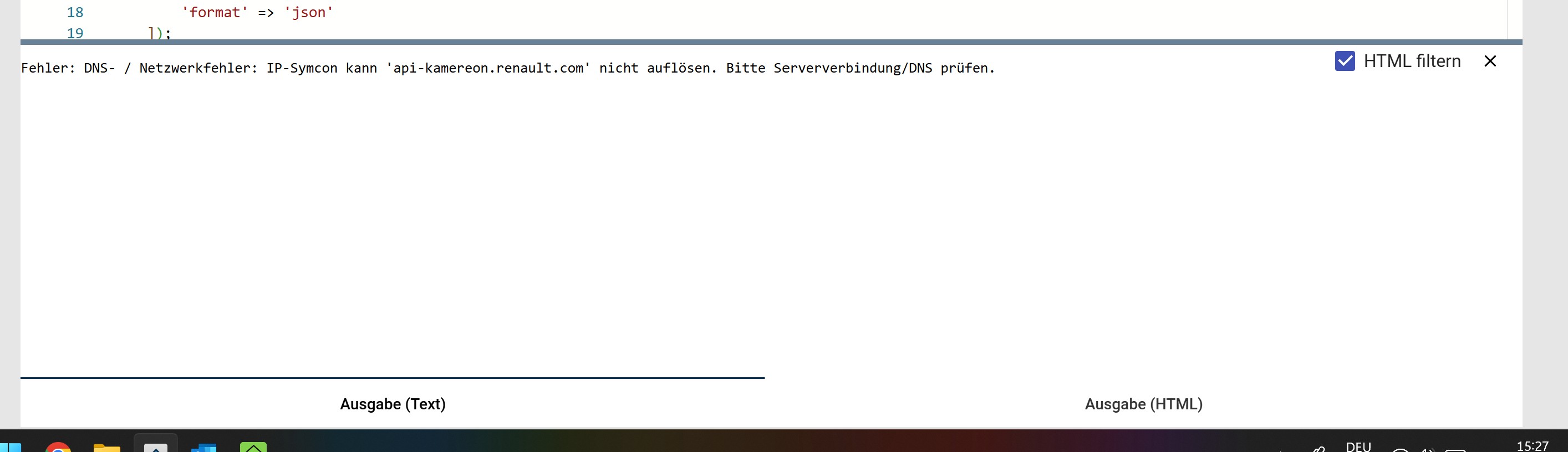
Hallo Leute da das Modul zum auslesen von Renault Fahrzeugen leider nicht mehr funktioniert habe ich mit Hilfe von Chat gpt (Habe null Ahnung vom Programmieren) mir einen PHP Code erstellen lassen, habe jetzt einige Fehler beheben können scheitere aber jetzt. vielleicht kann mir wer weiterhelfen bzw was hält ihr davon?
<?php
// — HIER DEINE DATEN EINTRAGEN —
$email = „xxxxxxxxxxxxx“; // Deine MyRenault E-Mail
$password = „xxxxxxxxxx“; // Dein MyRenault Passwort
$vin = „xxxxxxxxxxxxx“; // Die VIN deines Megane E-Tech (17-stellig)
// ----------------------------------
// DER KORREKTE API-KEY
$apiKey = „3_VgdkgtIRH3AdHvJm-cjV2ug2EFE0lxt0IJzMC4MFqZjFpn_GYFXVdNZ19L7wZX0N“;
$rootUrl = „https://api-kamereon.renault.com“;
try {
// SCHRITT 1a: InitAuth

$initUrl = "https://accounts.eu1.gigya.com/accounts.initRegistration";

$initData = http_build_query(\[

    'apiKey' => $apiKey,

    'format' => 'json'

\]);


$optsInit = \[

    "http" => \[

        "method" => "POST",

        "header" => "Content-Type: application/x-www-form-urlencoded\\r\\n",

        "content" => $initData,

        "timeout" => 5

    \]

\];

$contextInit = stream_context_create($optsInit);

$initResultRaw = @file_get_contents($initUrl, false, $contextInit);


if ($initResultRaw === false) {

    throw new Exception("Netzwerkfehler: Gigya-Server (Init) nicht erreichbar. Bitte Internetverbindung prüfen.");

}

$resInit = json_decode($initResultRaw, true);

$regToken = $resInit\['regToken'\] ?? '';


// SCHRITT 1b: Login via POST

$loginUrl = "https://accounts.eu1.gigya.com/accounts.login";

$postData = http_build_query(\[

    'apiKey' => $apiKey,

    'loginID' => $email,

    'password' => $password,

    'regToken' => $regToken,

    'include' => 'data,profile',

    'sessionExpiration' => 900

\]);


$optsLogin = \[

    "http" => \[

        "method" => "POST",

        "header" => "Content-Type: application/x-www-form-urlencoded\\r\\n" .

                    "Content-Length: " . strlen($postData) . "\\r\\n",

        "content" => $postData,

        "timeout" => 5

    \]

\];


$contextLogin = stream_context_create($optsLogin);

$loginResultRaw = @file_get_contents($loginUrl, false, $contextLogin);


if ($loginResultRaw === false) {

    throw new Exception("Netzwerkfehler beim Gigya-Login-Server.");

}


$res = json_decode($loginResultRaw, true);


if (isset($res\['errorCode'\]) && $res\['errorCode'\] != 0) {

    throw new Exception("Gigya Login fehlgeschlagen: " . $res\['errorMessage'\] . " (Code: " . $res\['errorCode'\] . ")");

}


if (!isset($res\['sessionInfo'\]\['cookieValue'\])) {

    throw new Exception("Kein Session-Cookie erhalten.");

}

$cookieValue = $res\['sessionInfo'\]\['cookieValue'\];


// PersonID direkt aus den Login-Daten ziehen

if (!isset($res\['data'\]\['personId'\])) {

    throw new Exception("PersonId konnte nicht aus den Login-Daten extrahiert werden.");

}

$personId = $res\['data'\]\['personId'\];


// SCHRITT 2: Kamereon JWT-Token holen

$jwtUrl = "https://accounts.eu1.gigya.com/accounts.getJWT?apiKey=" . $apiKey . "&login_token=" . $cookieValue . "&fields=data.personId,data.gigyaDataCenter&expiration=900";


$optsJwt = \[

    "http" => \[

        "method" => "GET",

        "timeout" => 5

    \]

\];

$contextJwt = stream_context_create($optsJwt);

$resJwtRaw = @file_get_contents($jwtUrl, false, $contextJwt);


if ($resJwtRaw === false) {

    throw new Exception("Fehler beim Abrufen des Kamereon JWT-Tokens.");

}

$resJwt = json_decode($resJwtRaw, true);


if (!isset($resJwt\['id_token'\])) {

    throw new Exception("Kamereon Token-Generierung fehlgeschlagen.");

}

$jwtToken = $resJwt\['id_token'\];


// Schritt 2b: Person und Account-ID auslesen

$accountUrl = $rootUrl . "/commerce/v1/persons/" . $personId;


$opts = \[

    "http" => \[

        "method" => "GET",

        "header" => "x-gigya-id_token: " . $jwtToken . "\\r\\n" .

                    "apikey: " . $apiKey . "\\r\\n",

        "timeout" => 5

    \]

\];

$context = stream_context_create($opts);

$resAccountRaw = @file_get_contents($accountUrl, false, $context);


if ($resAccountRaw === false) {

    throw new Exception("DNS- / Netzwerkfehler: IP-Symcon kann 'api-kamereon.renault.com' nicht auflösen. Bitte Serververbindung/DNS prüfen.");

}


$resAccount = json_decode($resAccountRaw, true);


if (!isset($resAccount\['accounts'\]\[0\]\['accountId'\])) {

    throw new Exception("Keine Renault-Konto-ID gefunden.");

}

$accountId = $resAccount\['accounts'\]\[0\]\['accountId'\];


// SCHRITT 3: Fahrzeugdaten abrufen (Batteriestatus)

$batteryUrl = $rootUrl . "/commerce/v1/accounts/" . $accountId . "/kamereon/kca/car-adapter/v2/cars/" . $vin . "/battery-status";


$optsData = \[

    "http" => \[

        "method" => "GET",

        "header" => "x-gigya-id_token: " . $jwtToken . "\\r\\n" .

                    "apikey: " . $apiKey . "\\r\\n" .

                    "Content-Type: application/json\\r\\n",

        "timeout" => 5

    \]

\];

$contextData = stream_context_create($optsData);

$batteryDataRaw = @file_get_contents($batteryUrl, false, $contextData);


if ($batteryDataRaw === false) {

    throw new Exception("Fehler beim Abruf der Fahrzeugdaten (Batteriestatus).");

}


$batteryData = json_decode($batteryDataRaw, true);

$attributes = $batteryData\['data'\]\['attributes'\];


// --- DATEN IN IP-SYMCON VARIABLEN SPEICHERN ---

$soc      = $attributes\['batteryLevel'\];

$range    = $attributes\['batteryAutonomy'\];

$plugged  = $attributes\['plugStatus'\];

$charging = $attributes\['chargeStatus'\];


SetValue(CreateVariableByName($\_IPS\['SELF'\], "Akkustand", 1, "\~Battery.100"), $soc);

SetValue(CreateVariableByName($\_IPS\['SELF'\], "Reichweite", 1, "\~Distance"), $range);

SetValue(CreateVariableByName($\_IPS\['SELF'\], "Kabel eingesteckt", 0, "\~Switch"), ($plugged == 1));

SetValue(CreateVariableByName($\_IPS\['SELF'\], "Wird geladen", 0, "\~Switch"), ($charging == 1));


echo "Erfolgreich ausgelesen!\\n";

echo "Akkustand: " . $soc . "%\\n";

echo "Reichweite: " . $range . " km\\n";
} catch (Exception $e) {
echo "Fehler: " . $e->getMessage() . "\\n";}
// — Hilfsfunktion zum automatischen Erstellen von Variablen —
function CreateVariableByName($parentID, $name, $type, $profile = „“) {
$vid = @IPS_GetVariableIDByName($name, $parentID);

if ($vid === false) {

    $vid = IPS_CreateVariable($type);

    IPS_SetParent($vid, $parentID);

    IPS_SetName($vid, $name);

    if ($profile != "") {

        IPS_SetVariableCustomProfile($vid, $profile);

    }

}

return $vid;
}
gruß Stefan
