Entweder ich bin blind, oder irgendwas ist mit dem Kommentar schief gelaufen?
PS: Ich hatte dir auch bei Discord geschrieben.
Entweder ich bin blind, oder irgendwas ist mit dem Kommentar schief gelaufen?
PS: Ich hatte dir auch bei Discord geschrieben.
Ich habe einzelne Zeilen Code kommentiert.
Grüße,
Kai
Kann man das Modul dann auf die alte API umschalten? Ich habe gerade keine Zeit meinen PiHole umzubauen, aber aktualisiere trotzdem fleißig die Symcon Module. Nicht, dass es dann knallt.
Das wird dann nicht mehr funktionieren, du musst dann auf dem alten Stand bleiben.
Grüße,
Kai
also ich habe sowohl das Modul als auch den PI auf aktuellem stand, aber leider bekomme ich das nicht hin. Kann mir jemand sagen ob das Modul angepasst installiert werden kann ? Denn für Anpassungen reichen meine Kenntnisse leider nicht aus
Das Modul funktioniert mit den aktuellen PI-Hole Versionen nicht mehr, was ich auch sehr schade finde.
Achso, ok ich hatte das so verstanden, das es wohl eine Anpassung gibt. Danke
Weil ich die Funktionalität schon sehr vermisst habe, habe ich ein Script erstellt, gemeinsam mit gemini.
Das bietet ähnliche Funktionen und vor allem die Möglichkeit PI-hole aus- und einzuschalten. Variablen werden unterhalb des Scripts automatisch angelegt, das Profil für die Ausschaltzeit ebenfalls.
<?php
// ==========================================
// KONFIGURATION
// ==========================================
$pihole_ip  = "172.x.y.z"; // IP oder Hostname des PI-hole
$password   = "abc"; // App-Passwort
$parentID   = $_IPS['SELF'];

// Profil für Assoziationen anlegen, falls nicht vorhanden
if (!IPS_VariableProfileExists("PiHole.Control")) {
    IPS_CreateVariableProfile("PiHole.Control", 1); // 1 = Integer
    IPS_SetVariableProfileAssociation("PiHole.Control", 1, "ein", "", 0x00FF00);
    IPS_SetVariableProfileAssociation("PiHole.Control", 0, "aus (unendlich)", "", 0xFF0000);
    IPS_SetVariableProfileAssociation("PiHole.Control", 30, "aus (30 Sek.)", "", 0xFFA500);
    IPS_SetVariableProfileAssociation("PiHole.Control", 300, "aus (5 Min.)", "", 0xFFA500);
}

// ==========================================
// AKTIONEN BEI SCRIPT-TRIGGER (SCHALTEN)
// ==========================================
if ($_IPS['SENDER'] == 'WebFront' || $_IPS['SENDER'] == 'VoiceControl') {
    $value = $_IPS['VALUE']; // Enthält 1, 0, 30 oder 300

    // 1. Variable in Symcon sofort auf den gewählten Wert setzen
    $vidStatus = CreateVariableByIdent($parentID, "Status", "Pi-hole Status", 1, 1, "PiHole.Control");
    IPS_SetVariableCustomAction($vidStatus, $_IPS['SELF']);
    SetValue($vidStatus, $value);

    // 2. Skript-Timer dynamisch anpassen, damit kurze Timer zeitnah abgeholt werden
    $scriptTimer = 300; // Standard: 5 Minuten
    if ($value == 30) {
        $scriptTimer = 35;  // Kurz nach 30 Sek. abfragen
    } elseif ($value == 300) {
        $scriptTimer = 305; // Kurz nach 5 Min. abfragen
    }
    IPS_SetScriptTimer($_IPS['SELF'], $scriptTimer);

    // 3. Befehl an Pi-hole senden
    $sid = getPiHoleSID($pihole_ip, $password);
    if ($sid) {
        if ($value == 1) {
            setPiHoleBlocking($pihole_ip, $sid, true);
        } else {
            $seconds = ($value > 0) ? $value : null;
            setPiHoleBlocking($pihole_ip, $sid, false, $seconds);
        }
    }
    return;
}

// ==========================================
// MAIN: WERTEN ABFRAGEN & VARIABLEN UPDATEN
// ==========================================
$sid = getPiHoleSID($pihole_ip, $password);

if (!$sid) {
    $vidStatus = CreateVariableByIdent($parentID, "Status", "Pi-hole Status", 1, 1, "PiHole.Control");
    IPS_SetVariableCustomAction($vidStatus, $_IPS['SELF']);
    SetValue($vidStatus, 0);
    IPS_LogMessage("Pi-hole", "Authentifizierung fehlgeschlagen. App-Passwort prüfen.");
    return;
}

// 1. Blocking Status abfragen
$blockingData = callPiHoleAPI($pihole_ip, "/api/dns/blocking", "GET", $sid);
$rawBlocking = $blockingData['blocking'] ?? false;
$timerActive = $blockingData['timer'] ?? 0;

if (is_string($rawBlocking)) {
    $isBlocking = (strtolower($rawBlocking) === 'true' || strtolower($rawBlocking) === 'enabled' || $rawBlocking === '1');
} else {
    $isBlocking = (bool)$rawBlocking;
}

// 2. Statistiken abfragen
$stats = callPiHoleAPI($pihole_ip, "/api/stats/summary", "GET", $sid);

// ==========================================
// VARIABLEN ANLEGEN & BEFÜLLEN
// ==========================================
$vidStatus = CreateVariableByIdent($parentID, "Status", "Pi-hole Status", 1, 1, "PiHole.Control");
IPS_SetVariableCustomAction($vidStatus, $_IPS['SELF']);

if ($isBlocking) {
    SetValue($vidStatus, 1); // Wenn Pi-hole wieder aktiv ist -> Auf "Ein" springen
    IPS_SetScriptTimer($_IPS['SELF'], 300); // Timer wieder auf Standard (5 Min.) beruhigen
} else {
    $currentVal = GetValue($vidStatus);
    if ($timerActive == 0 && $currentVal > 1) {
        SetValue($vidStatus, 0);
        IPS_SetScriptTimer($_IPS['SELF'], 300);
    } else {
        // Timer-Intervall je nach gewähltem Zustand beibehalten oder korrigieren
        if ($currentVal == 30) {
            IPS_SetScriptTimer($_IPS['SELF'], 35);
        } elseif ($currentVal == 300) {
            IPS_SetScriptTimer($_IPS['SELF'], 305);
        } else {
            IPS_SetScriptTimer($_IPS['SELF'], 300);
        }
    }
}

if (isset($stats['queries'])) {
    SetValue(CreateVariableByIdent($parentID, "QueriesTotal", "Anfragen Gesamt (24h)", 1, 10), (int)($stats['queries']['total'] ?? 0));
    SetValue(CreateVariableByIdent($parentID, "QueriesBlocked", "Blockierte Anfragen (24h)", 1, 11), (int)($stats['queries']['blocked'] ?? 0));
    SetValue(CreateVariableByIdent($parentID, "PercentBlocked", "Blockiert (%)", 2, 12, "~Percent.100"), (float)($stats['queries']['percent_blocked'] ?? 0));
}

if (isset($stats['gravity'])) {
    $gravity = $stats['gravity'];
    SetValue(CreateVariableByIdent($parentID, "DomainsOnList", "Domains auf Blockliste", 1, 13), (int)($gravity['domains_being_blocked'] ?? 0));

    $lastUpdate = $gravity['last_update'] ?? $gravity['updated'] ?? null;
    if ($lastUpdate) {
        if (is_numeric($lastUpdate)) {
            $formattedDate = date("d.m.y, H:i:s", (int)$lastUpdate);
        } else {
            $timestamp = strtotime($lastUpdate);
            $formattedDate = $timestamp ? date("d.m.y, H:i:s", $timestamp) : $lastUpdate;
        }
        $vidGravity = CreateVariableByIdent($parentID, "GravityLastUpdated", "Gravity Last Updated", 3, 14);
        SetValue($vidGravity, $formattedDate);
    }
}

// ==========================================
// HELPER FUNKTIONEN
// ==========================================

function getPiHoleSID($ip, $password) {
    $url = "https://$ip/api/auth";
    $payload = json_encode(["password" => $password]);

    $ch = curl_init($url);
    curl_setopt($ch, CURLOPT_RETURNTRANSFER, true);
    curl_setopt($ch, CURLOPT_POST, true);
    curl_setopt($ch, CURLOPT_POSTFIELDS, $payload);
    curl_setopt($ch, CURLOPT_HTTPHEADER, ['Content-Type: application/json']);
    curl_setopt($ch, CURLOPT_TIMEOUT, 5);
    curl_setopt($ch, CURLOPT_SSL_VERIFYPEER, false);
    curl_setopt($ch, CURLOPT_SSL_VERIFYHOST, false);

    $response = curl_exec($ch);
    $httpCode = curl_getinfo($ch, CURLINFO_HTTP_CODE);
    curl_close($ch);

    if ($httpCode == 200) {
        $json = json_decode($response, true);
        return $json['session']['sid'] ?? null;
    }
    return null;
}

function callPiHoleAPI($ip, $endpoint, $method = "GET", $sid = null, $postData = null) {
    $url = "https://$ip" . $endpoint;
    $ch = curl_init($url);

    $headers = ['Content-Type: application/json'];
    if ($sid) {
        $headers[] = "X-FTL-SID: $sid";
    }

    curl_setopt($ch, CURLOPT_RETURNTRANSFER, true);
    curl_setopt($ch, CURLOPT_HTTPHEADER, $headers);
    curl_setopt($ch, CURLOPT_TIMEOUT, 5);
    curl_setopt($ch, CURLOPT_SSL_VERIFYPEER, false);
    curl_setopt($ch, CURLOPT_SSL_VERIFYHOST, false);

    if ($method === "POST") {
        curl_setopt($ch, CURLOPT_POST, true);
        if ($postData) {
            curl_setopt($ch, CURLOPT_POSTFIELDS, json_encode($postData));
        }
    }

    $response = curl_exec($ch);
    curl_close($ch);

    return json_decode($response, true);
}

function setPiHoleBlocking($ip, $sid, $enable, $seconds = null) {
    $payload = ["blocking" => (bool)$enable];
    if (!$enable && $seconds !== null) {
        $payload["timer"] = (int)$seconds;
    }

    return callPiHoleAPI($ip, "/api/dns/blocking", "POST", $sid, $payload);
}

function CreateVariableByIdent($parent, $ident, $name, $type, $position, $profile = "") {
    $vid = @IPS_GetObjectIDByIdent($ident, $parent);
    $vid = ($vid === false) ? IPS_CreateVariable($type) : $vid;
    if (IPS_GetParent($vid) !== $parent) IPS_SetParent($vid, $parent);
    IPS_SetName($vid, $name);
    IPS_SetIdent($vid, $ident);
    IPS_SetPosition($vid, $position);
    if ($profile != "" && IPS_VariableProfileExists($profile)) IPS_SetVariableCustomProfile($vid, $profile);
    return $vid;
}
Moin Ralf,
mag bei mir nicht. Adresse ist 192.168.178.2:5080. Nachdem ich https durch http ersetzt hatte kam kein Authentifizierungsfehler mehr aber auch keine Daten. Script sagt das PiHole aus ist aber die GUI von PiHole sagt das es läuft.
Ich benutze:

Ralf
Die URL hängt vermutlich davon ab, wie du PI-hole installiert eingerichtet hast.
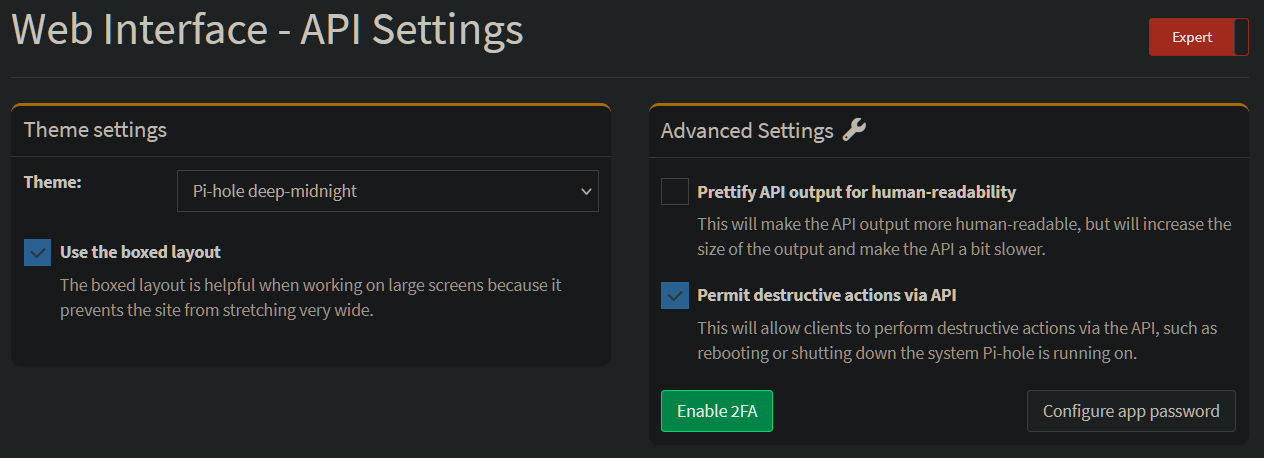
Das Passwort ist nicht das aus der Oberfläche zu Web Anmeldung, sondern “Configure app password”
Moin Ralf,
PiHole läuft im Docker das PiHole bereit stellt. Auch mit dem API Passwort geht leider nicht. Ich muss mal ein paar Echos einbauen.
Ralf
Moin,
selbe Situation bei mir.
Pi-Hole läuft auf NAS im Docker, nach Update auf die neuste Version funktioniert es bei mir auch nicht mehr.
Das Modul läuft nicht mehr und das Script bekomme ich nicht zum laufen.
Hab die IP vom NAS eingetragen, mit und ohne Port, App Passwort oder Web Zugriff Passwort versucht. Alles ohne Erfolg.
Hat das jemand mit der Konstellation am Laufen und kann unterstützen
Das Modul ist komplett überarbeitet, es gibt eine neue Version 2.0 (Beta).
Alle Infos dazu im ersten Thread und Changelog.
Wichtig ist, die alte Instanz gibt es nicht mehr.
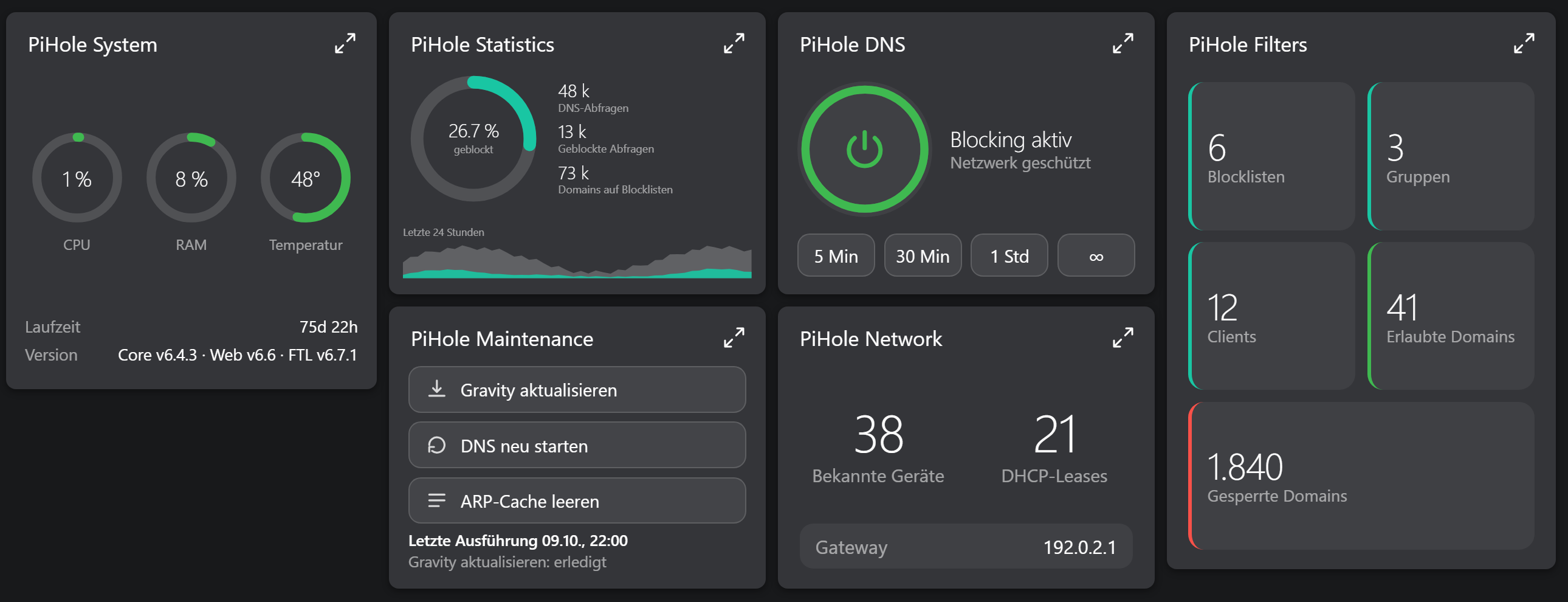
Es gibt auch Kacheln. 
Grüße,
Kai
Moin @KaiS
schön, das es hier weiter geht.
Ich habe mir das Modul wieder installiert.
Wenn ich einen Konfigurator anlegen möchte erhalte ich diesen Fehler:
Konnte Instanz nicht erstellen

Warning: ConnectParent is not available anymore. Override GetCompatibleParents instead. in /mnt/data/symcon/modules/.store/info.schnittcher.ips.pihole/PiHoleConfigurator/module.php on line 27
 (Code: -32603)
Schade …
Gruß,
Loerdy
Moin,
ich bin anscheinend zu blöd……
Im ModuleStore wird mir leider immer nur das alte Modul angeboten.
Wie lautet denn die genaue Bezeichnung für das Modul, brauch ich doch wenn es Beta ist!?
Vielen Dank schon mal im Vorraus für die Hilfe
Dort musst du auf Beta umstellen.
Grüße,
Kai
Moin Kai,
DANKE fürs auf Pferd helfen
Jetzt hab ich’s gefunden. Der untere Teil des Fensters war auf meine IPad nicht zu sehen.
Sehr gut dann viel Spaß damit.
Grüße,
Kai
Steht irgendwo beschrieben, wie ich an die API komme? Wäre nett, wenn man mich da aufs richtige Gleis setzen könnte.
Gruß
Marc
Einfach im Modul die IP und Passwort eingeben.
Welche Version von Pi-Hole hast du denn?
Grüße,
Kai